
Platform
The connected workspace for MS4 inspections, tasks, GIS context, and annual reporting.
NPDESTracker supports inspections, sites and contacts, Notice / Letter workflows, message replies, follow-up tasks, map and GIS context, reporting evidence, setup, imports, exports, and admin tools, all in one workspace, shaped around how a Phase II MS4 program moves through the year.
Overview
What NPDESTracker is, plainly.
A browser-based workspace that holds the records most stormwater teams keep in spreadsheets, PDFs, scanned forms, and shared drives. Inspections, IDDE, sites, outfalls, BMPs, public education, public participation, and the annual report all live in the same system, tied to the permit and the agency you answer to.
Runs in a browser
No desktop install or VPN setup. The responsive web workspace can open on a phone, tablet, or laptop where a reliable connection is available.
Shaped around the permit
Modules track the six Minimum Control Measures, plus the records your state agency asks about in the annual report. Not a generic inspection form.
Built for field use
Responsive inspection forms are available in mobile web where a reliable connection is available. Photo and GPS behavior should be verified on the agency's devices during evaluation.
Records hold up later
Every entry is timestamped and attributed. When a reviewer asks who saved what and when, the answer is on the record.
01 · Workflows
Core workflows your program runs on.
The everyday motions of an MS4 program, modeled as first-class workflows rather than shoehorned into a generic forms app.
Capture inspections in the field
Responsive inspection forms for connected phones and tablets, with device-specific photo and GPS behavior verified during evaluation.
Track sites, outfalls, and BMPs
A living, mapped inventory of every asset your program is responsible for, with inspection history, ownership, and status on each.
Investigate illicit discharges
Complaint, field screening, source tracing, and enforcement, documented in a single traceable thread per incident.
Issue and track enforcement
Notices of violation, compliance schedules, and resolution records with a defensible audit trail from first observation to closure.
Manage public education and outreach
Events, audiences reached, and materials distributed, documented to MCM 1 and MCM 2 requirements as you go.
Assemble annual MS4 reports
Permit-aligned rollups of the full program year, ready to review and submit. No last-minute reformatting.
Coordinate across roles
Field crews, coordinators, and directors see the same underlying data through views tailored to their work.
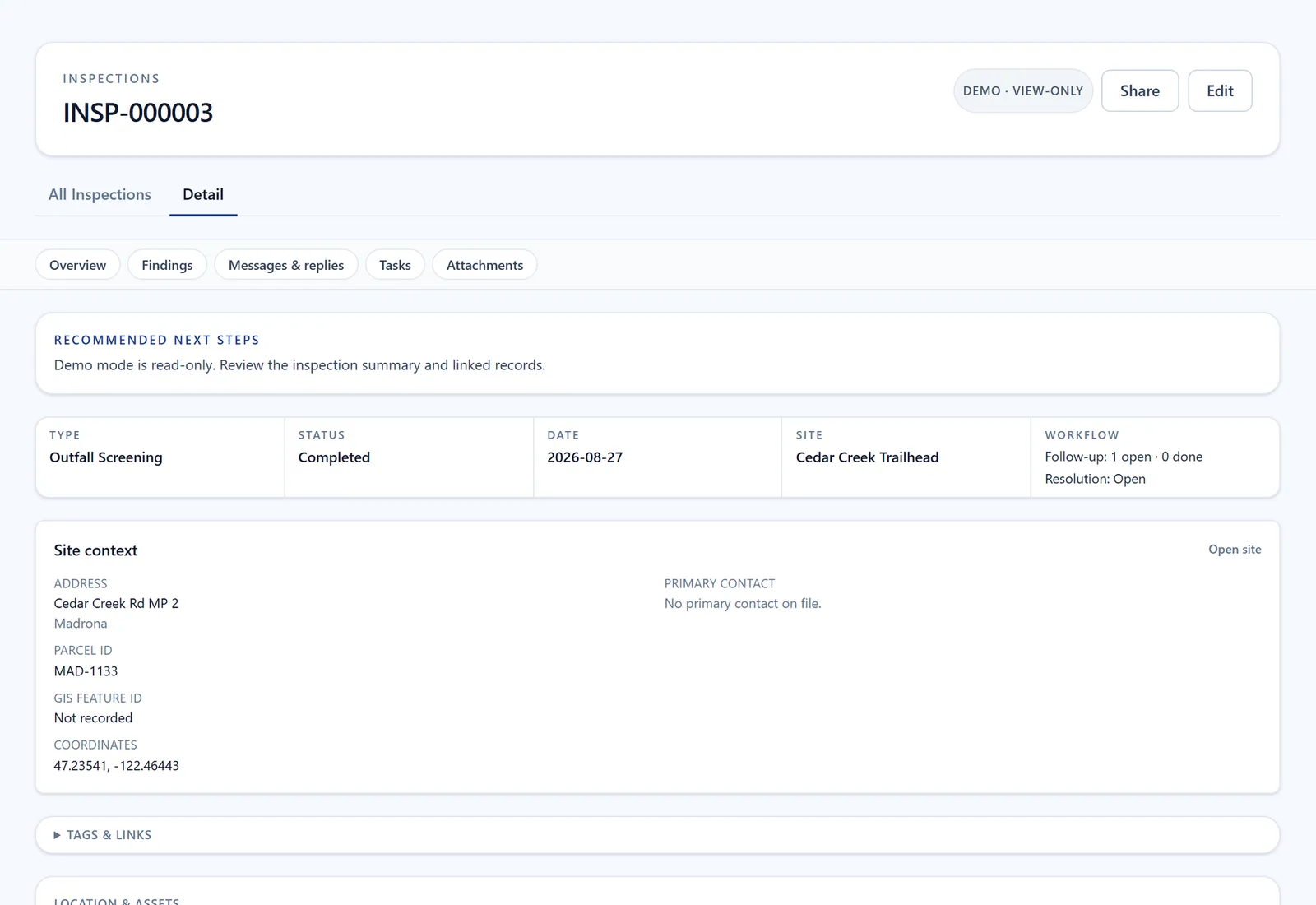
Inspections: the site, findings, follow-up work, and supporting files in one record. Screen from the public demo on fictional City of Madrona data.
Open Inspections in the demo (opens in a new tab)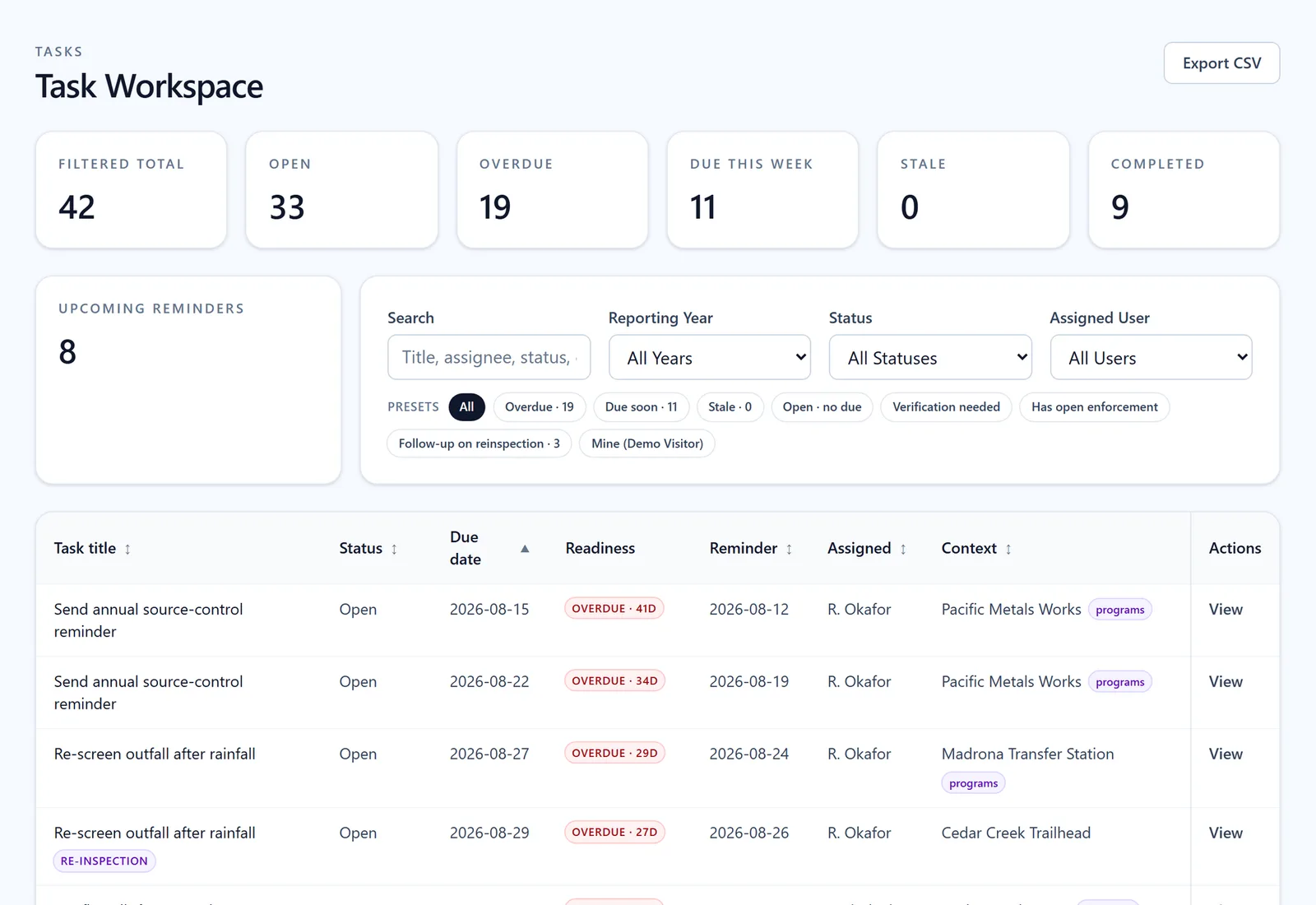
Tasks: see what is overdue, filter by person or status, and open the work that needs attention. Screen from the public demo on fictional City of Madrona data.
Open Tasks in the demo (opens in a new tab)02 · Field inspections
Inspections that work the way the field actually works.
Inspectors are in trucks, at outfalls behind industrial facilities, on active construction sites, not at a desk. NPDESTracker uses a responsive browser interface on phones, tablets, and laptops where a reliable connection is available. Saving field records requires connectivity. A production offline mode and native field app are not currently offered, so agencies should verify the connected mobile workflow on their own devices during evaluation.
- Structured, permit-aligned inspection forms, configurable per program and inspection type
- Responsive inspection forms for connected phones and tablets
- Photo and GPS behavior verified on the agency's devices during evaluation
- Conditional logic so only the questions that apply to this inspection show up
- Re-inspection scheduling with automatic follow-up flags on deficient findings
- Inspector sign-off with a user-attributed, timestamped record of the completed work
- Runs in a modern browser where a reliable connection is available, with no production offline mode or native field app currently offered
03 · GIS workspace
Stormwater is spatial. Your software should be too.
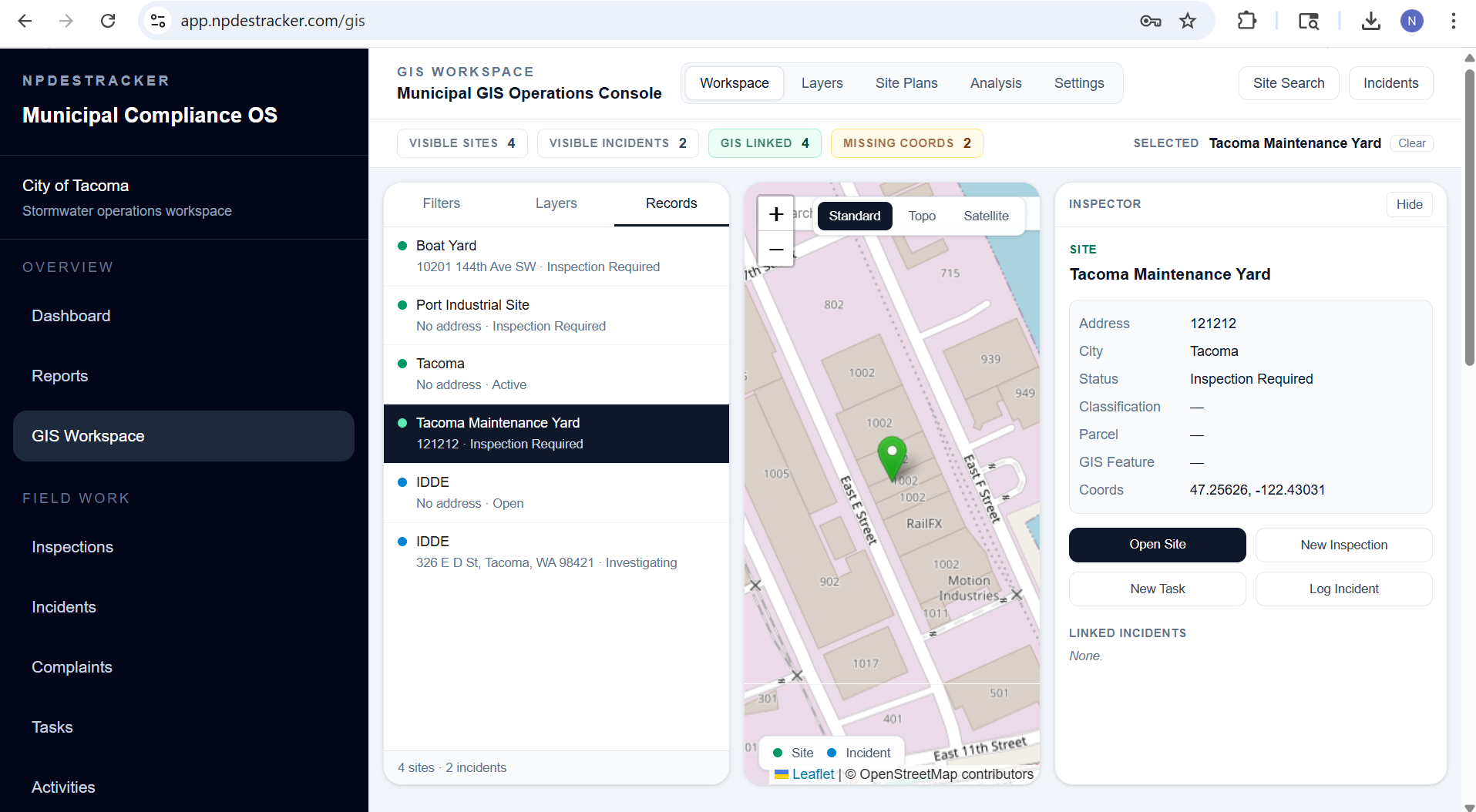
Every outfall has a location. Every BMP has a parcel. Every complaint has an address. NPDESTracker treats spatial context as a first-class part of the compliance workflow, not a separate GIS product you have to hop into. See how the GIS workspace works, or read about why most municipal programs need both MS4 software and ArcGIS.
04 · Reporting & audit readiness
Annual reporting as a review, not a rebuild.
Every MS4 program knows the pattern: scrambling to assemble the annual report from spreadsheets, emails, and half-remembered events from nine months ago. NPDESTracker flips that. Your annual report is already assembled. It's the live state of your program, rolled up and formatted for your state agency.
- Annual MS4 report structure aligned to state agency expectations
- Live rollups so every inspection, screening, and enforcement action flows in automatically
- Reporting-year scoping that locks prior-year data while you continue to operate in the current year
- CSV exports for supported operational records, with broader export support available during onboarding and support requests
- Audit-ready record history on every compliance item, attributed to the user who entered it
- Year-over-year trend views for program review, council briefings, and grant applications
Detailed product pages: annual reporting, Smart Draft, public education tracking, public participation tracking, MS4 metrics dashboard, and the BMP guide and field reference.
05 · IDDE & investigations
From complaint to closure, in one thread.
Illicit discharge investigations can span days or months. NPDESTracker keeps the whole arc in one traceable record, with every participant, photo, screening result, and action step in sequence. For a working playbook on running an IDDE investigation cleanly, see the complaint-to-closure guide.
Complaint intake
Capture the call the moment it comes in. Address, reporter, classification, and initial photos, all tied to a mapped location from the start.
Field screening
Log dry-weather observations, indicator panel results, and sampling data in the field, with photo evidence attached to the incident.
Source tracing
Work upstream from the outfall. Document each step, suspected source, and evidence collected on the same incident record.
Enforcement linkage
Escalate directly into a notice of violation or compliance order. No re-keying, no separate system. The investigation becomes the evidence.
Closure and documentation
Final status, responsible party, and corrective action recorded for both program and permitting-authority review.
Outfall timeline
Every incident, screening, and inspection on that outfall, ever. One view, always current, always attributable.
06 · Built for your team
Around the people responsible for the permit.
Different roles need different views of the same underlying program data. NPDESTracker meets each person where their work lives.
Stormwater Coordinator
Program-wide status at a glance. Overdue inspections, open IDDE cases, and reporting gaps surface before they become compliance problems.
Field Inspector
Works through responsive mobile web where a reliable connection is available. A production offline mode and native field app are not currently offered.
Public Works Director
Reviews program trends, prepares council briefings, and oversees compliance posture across departments with one live source of truth.
Environmental Compliance Officer
Manages enforcement, tracks notices of violation, and maintains a defensible audit trail from first observation through closure.
Reporting & Grants Staff
Pulls permit-aligned annual reports, exports data for state submittals, and supports grant documentation without rebuilding spreadsheets.
City Engineer
Uses BMP inventory and inspection history to guide capital projects, maintenance priorities, and stormwater system upgrades.
For a topic-by-topic index of the workflow guides, see the stormwater software resources page.
07 · Configurable by your municipality
Built-in modules are the starting point. Configuration is the operating model.
NPDESTracker gives MS4 teams a connected workspace out of the box, then lets admins configure the parts that are local: terminology, forms, fields, dropdowns, displays, custom modules, exports, and mobile field workflows. Built-in modules are the starting point, not the ceiling.
The parts that should be local are handled by the municipality in the workspace. Scoped custom work for agency-specific forms, modules, or reports is available separately.
See configurable stormwater software for the full breakdown, and pricing for what is included with each annual tier.
Included self-service configuration
- Module toggles, so the workspace only shows what your program runs
- Terminology renaming to match local language and the permit
- Configurable fields per inspection kind: which fields show, which are required, and what the labels say
- Dropdown values (BMP types, finding categories, enforcement actions) editable in the workspace
- Custom modules built from the platform's configurable building blocks: record types, fields, dropdowns, and workflows
- Display settings, default views, visible columns, and dashboard widgets configurable per tenant and per role
- Exports in supported formats for modules included in the order; scope confirmed during setup
- Connected mobile-web workflows for phones and tablets, verified on agency devices during evaluation
Built for real MS4 program variation
Configurable for agency-specific workflows. Scoped setup for larger programs.
Configuration covers module toggles, terminology, dropdowns, and custom modules out of the box. Larger programs often need scoped setup for agency-specific fields, forms, and core-record configuration.
Running a Phase II program out of public works, engineering, or a stormwater team? See how NPDESTracker supports Phase II public works teams and scoped implementation planning.
08 · Executive readiness dashboard
Give directors a clear view of MS4 program health.
Inspections, IDDE cases, tasks, evidence links, and program-by-program health roll up into a readiness command center. The dashboard view is what program managers and directors review before the next reporting cycle.
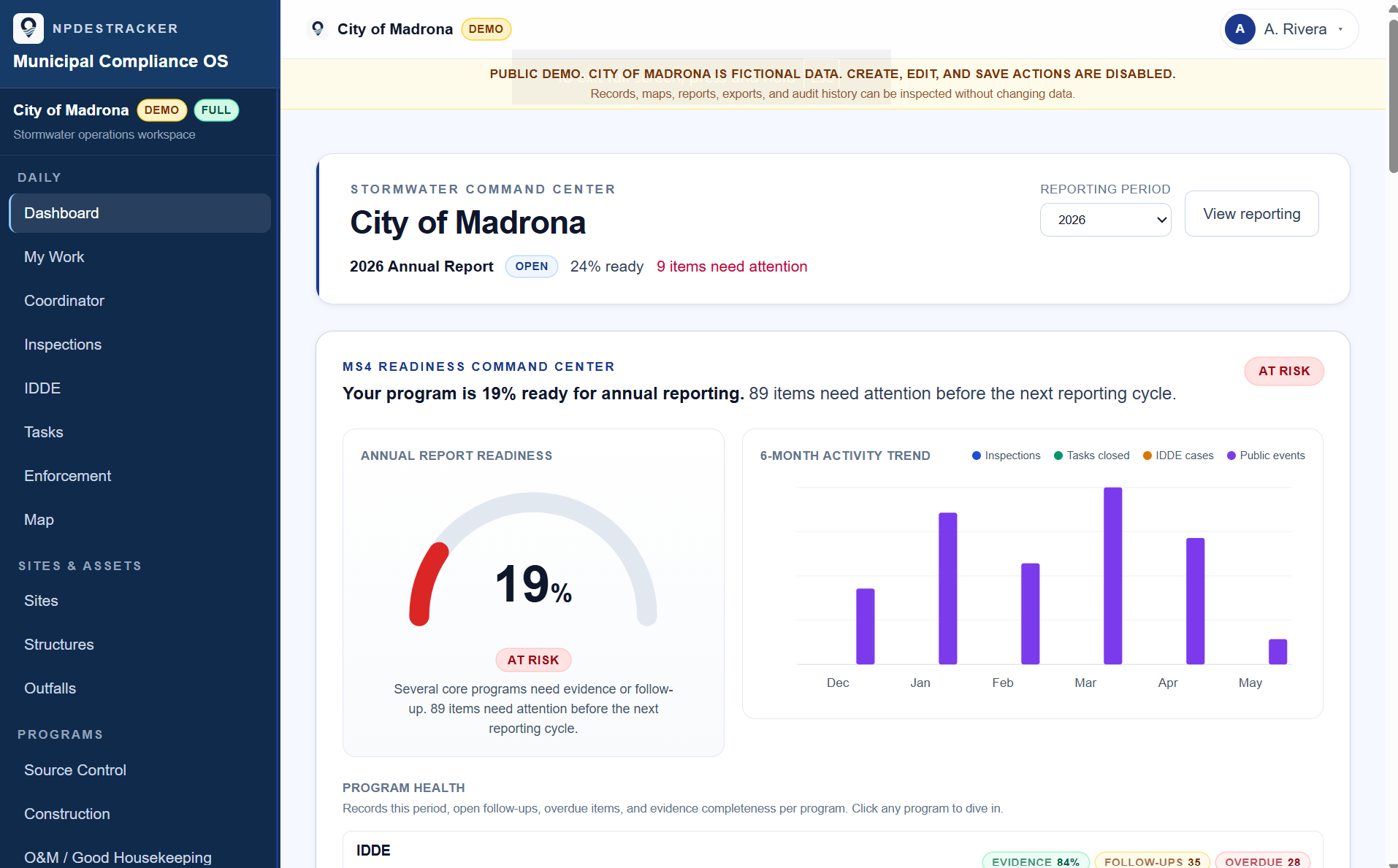
Where the reporting year stands.
Annual report progress at a glance, with the items still open visible per question instead of buried in a spreadsheet.
Six months of the work, in one view.
Inspections logged, tasks closed, IDDE cases opened, and public works activity, charted month by month from the records the team kept.
Status by module, evidence gaps surfaced.
Each MS4 program area carries its own health row so deficiencies surface before they become audit findings.
Fully populated, fictional product-example data. This expanded readiness dashboard is walked through on request and is not part of the public demo. Live tenants configure modules, thresholds, and dashboard widgets per program.
See the platform, with sample data.
Open the read-only sample workspace. It runs in an isolated demo tenant on fictional City of Madrona data and opens Dashboard, My Work, Coordinator, Inspections, Sites, Outfalls, Contacts, Organizations, Tasks, Map, and read-only Setup. Programs, Annual Reporting, and Messages & Notices are locked, and each says why. Full inspection creation, notices and replies, reporting evidence, imports, exports, setup changes, and admin workflows are walked through on request. If it looks like a fit, request a private demonstration on your own program's workflows; annual plans start at $1,499, plus applicable taxes.