
GIS workspace
Stormwater is spatial. Your compliance software should be too.
The GIS workspace is one part of the broader NPDESTracker platform. It sits next to inspections, sites and contacts, notices and replies, reporting evidence, and admin. NPDESTracker treats spatial context as a first-class part of the compliance workflow. Outfalls, BMPs, sites, and incidents live on a live map alongside the records that document them. The product is built to coexist with the GIS your agency already runs, not replace it. The public demo is limited to Dashboard, My Work, Coordinator, Inspections, Sites, Outfalls, Contacts, Organizations, Tasks, Map, and read-only Setup; the full map and import workflow is walked through on request.
01 · Live map
Your stormwater inventory, on one map.
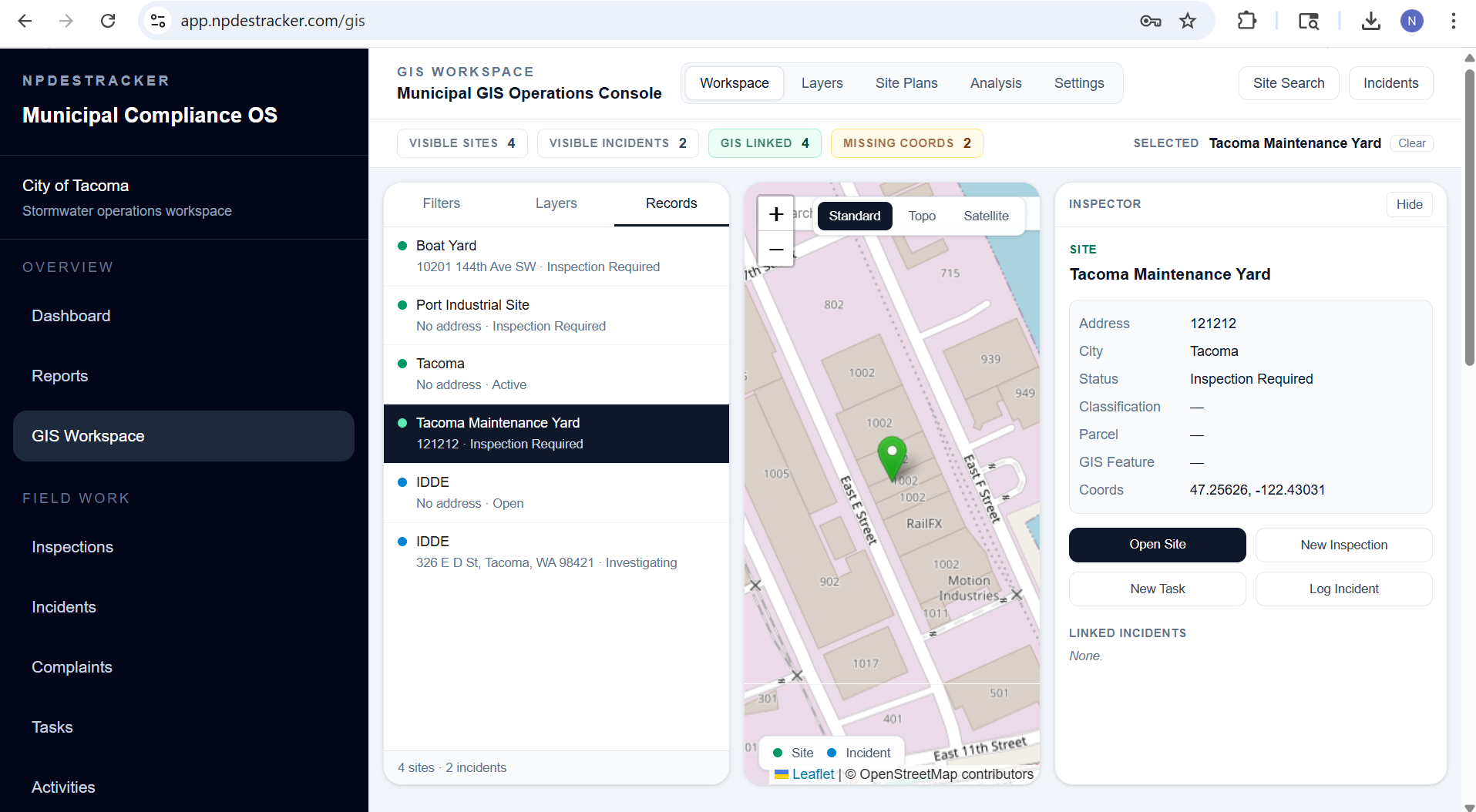
Most coordinators carry a mental map of where their outfalls, BMPs, and active investigations sit. NPDESTracker puts that map on a screen. Every spatial record in the program is on it, color coded by status, with the underlying record one click away.
- Outfalls, with classification, receiving water, and inspection history
- Structural BMPs, with type, ownership, and maintenance status
- Construction sites, with active disturbance status and inspection cadence
- Municipal facilities under MCM 6 with their housekeeping records
- IDDE incidents, from complaint intake through closure
- Sample and screening locations tied to dry weather and wet weather observations
02 · Coexists with ArcGIS and QGIS
Designed to live alongside your existing GIS, not replace it.
Most public works teams already maintain their authoritative GIS in ArcGIS Online, ArcGIS Enterprise, or QGIS. That work belongs there. NPDESTracker is the operational layer for the compliance program that runs against that data, not a duplicate system asking your GIS staff to re-key everything.
Outfalls, BMPs, and sites can come in from your existing layers as GeoJSON or shapefile. Coordinates and per-feature attributes are preserved on import. When data needs to flow back out for state-agency submittals or QA inside ArcGIS, CSV exports cover supported operational records, with broader spatial-format export support available during onboarding and support requests.
NPDESTracker is developed by Wood Technologies LLC, a Startup Partner in the Esri Partner Network. Connected ArcGIS workflows are available today: a named user signs in with their own ArcGIS account, and NPDESTracker reads their maps and layers read-only, without writing to them. File imports, exports and the standard coordinate systems described on this page remain supported alongside it. The full posture, including how sign-in works, what the read-only boundary covers, how agencies stay isolated from each other, and where each kind of data is stored, is on the ArcGIS integration and security page.
03 · Standard formats in, standard formats out
Data moves cleanly in both directions.
The interop story is intentionally simple. Open formats, standard coordinates, no proprietary middleware to maintain.
- Imports GeoJSON and shapefile so existing ArcGIS or QGIS layers come in directly
- CSV import with latitude and longitude for spreadsheet-tracked inventories
- CSV exports for supported operational records, with broader spatial-format export support available during onboarding and support requests
- Standard WGS84 coordinates stored on every spatial record
- Per-feature attributes preserved on import so layer fidelity stays intact
04 · Original files retained
Your uploaded GIS files stay yours, separately from the workspace display layer.
When your team uploads a GIS layer to NPDESTracker, the original file is preserved separately from the map-optimized display layer the workspace uses to draw features in a browser. Display layers may be optimized for browser performance on large datasets, while the original uploaded file is retained where it was provided.
That separation matters for two practical reasons. First, browsers are not the right tool for rendering millions of attributes on every feature, so the display copy is shaped to stay responsive on a coordinator's laptop. Second, the file your GIS staff handed over should still be the file your GIS staff can get back, untouched by display-time trimming.
Data ownership stays with the customer. NPDESTracker is designed so cities can export their records in standard formats, and the same posture applies to GIS uploads: the original is what gets handed back if you ever leave or move the data elsewhere.
05 · Field workflow
GPS and photos on the record they belong to.
The map is not a separate product. Configured inspection workflows can request coordinates and attach photo evidence in connected mobile web. Permission, accuracy, and capture behavior vary by device and browser, so agencies should verify them during evaluation. A production offline mode and native field app are not currently offered.
- Configured workflows can request browser geolocation; permission and accuracy vary by device
- Photo attachment and location behavior is verified on agency devices during evaluation
- Inspector panel shows address, parcel info, and linked records without leaving the map
- On-map filters by status, classification, or open investigation
- Switchable basemaps for street, topographic, and satellite views
The full field inspection workflow is documented on the inspections page.
06 · BMP inventory mapping
A live BMP inventory you can actually maintain.
Structural BMPs are some of the hardest assets for a small program to keep current. They sit on private parcels, ownership shifts, and the spreadsheet that tracked them often does not survive a staff transition. NPDESTracker keeps the BMP inventory on the same map as the rest of the program, so the type, ownership, last inspection, and maintenance status are visible the moment you open a parcel.
Imports come in from your existing GIS layer or from a CSV with coordinates. Inspections and maintenance records attach directly to the BMP, which means the MCM 5 section of the annual report is reading from the actual asset list rather than a year-end reconstruction.
For more on how BMPs go missing from municipal inventories and what a defensible BMP record looks like, see the post-construction BMP tracking guide.
07 · What this is, what it isn't
Honest about scope.
We would rather be useful inside a clear scope than oversell a generic GIS story.
What this is
- A GIS-aware compliance workspace built around your MS4 program
- Designed to coexist with the GIS your agency already runs
- Spatial context on every site, outfall, BMP, and incident
- Standard format imports and exports so data moves cleanly in both directions
What this is not
- A replacement for ArcGIS Online, ArcGIS Enterprise, or QGIS
- A surveying tool or a CAD system
- A general-purpose GIS platform for non-stormwater work
- Two-way synchronization or write-back into your ArcGIS layers. The connected integration is read-only.
Open the map.
The public tour opens the GIS view inside an isolated, read-only demo tenant with fictional data. The map is the one interactive surface in the tour. No signup and no call.