
Reporting
Annual report numbers stay tied to the records behind them.
Annual reporting is one module of the broader NPDESTracker platform. It reads from inspections, IDDE, sites and contacts, public education and behavior change campaign records, public participation records, and the rest of the workspace. Phase II MS4 annual reporting software that helps organize field work, outreach, and follow-up as annual reporting evidence. Counts are computed from the records you already keep, and each reported number stays traceable back to the records behind it. Override any value with a one-line audit-log entry. The first complete annual reporting template wired in is the Western Washington Phase II 2024-2029 template. Additional state templates are added only after independent verification. Staff review, certification, and submission to the state agency remain human responsibilities. The public demo is limited to Dashboard, My Work, Coordinator, Inspections, Sites, Outfalls, Contacts, Organizations, Tasks, Map, and read-only Setup; the full evidence-assembly workflow is walked through on request.
01 · How rollups work
We count what you record.
Every count in the annual report is computed from the underlying records logged through the year. If you ran 14 construction inspections last quarter, the report sees 14, traceable to those 14 records. The full inspection workflow is detailed on the inspections page.
Counts roll up from
- Construction site inspections
- Post-construction BMP inspections
- IDDE complaints, screenings, and source-tracing records
- Public education events and outreach activities
- Public involvement records and meeting minutes
- Municipal facility inspections and good-housekeeping logs
- Enforcement actions and notices of violation
- Staff training records
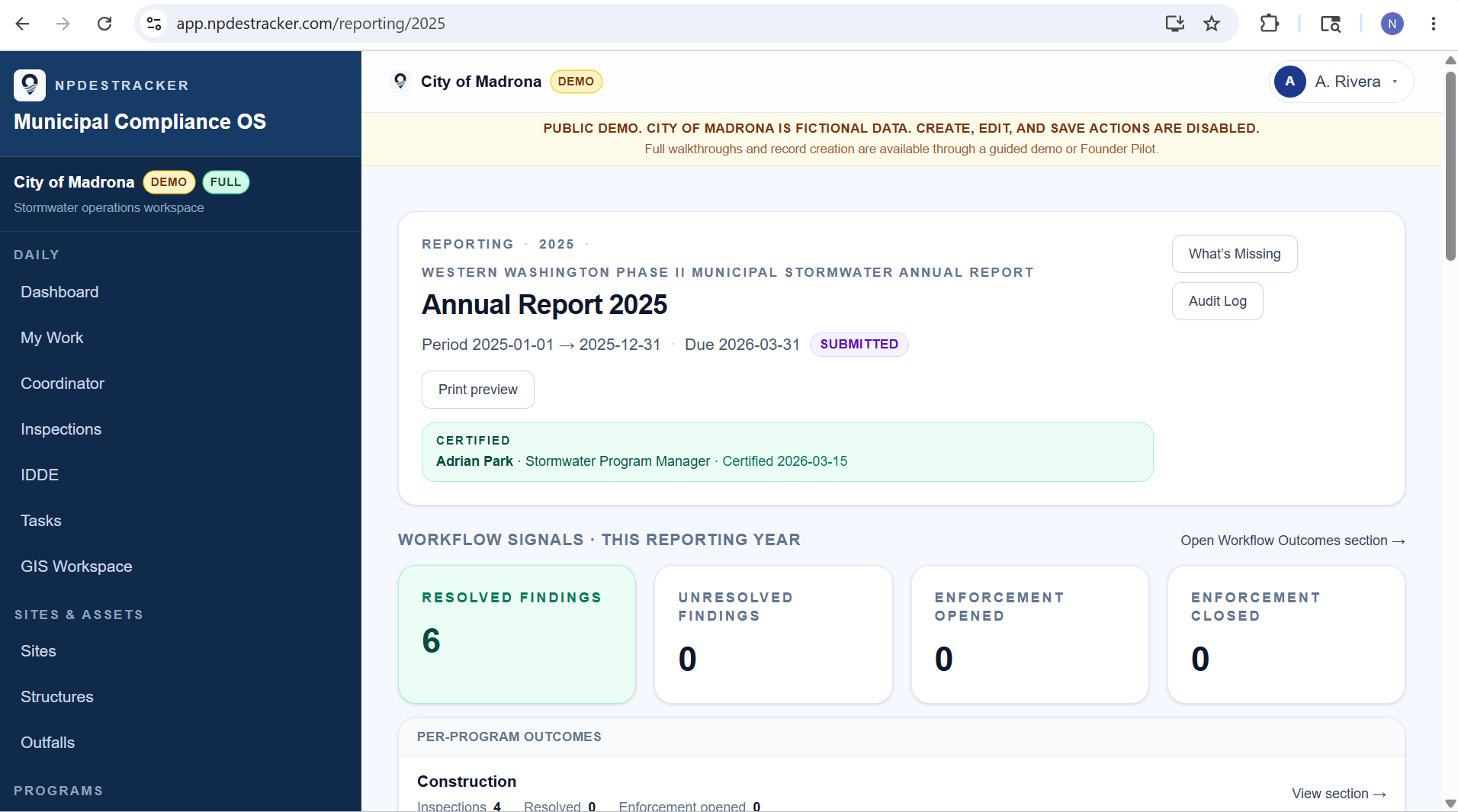
The reporting workspace shows the year as a set of questions, counts, narratives, and linked evidence. This fictional product example shows the shape of a finished annual report. Annual Reporting is not unlocked in the public Daily demo; request a guided walkthrough to review this workflow.
02 · Annual report
The annual report is a view of your year, not a separate document.
Each MCM section in the annual report rolls up automatically from the workflow that feeds it. IDDE incidents flow into MCM 3, construction inspections into MCM 4, post-construction BMPs into MCM 5, and public outreach events into MCM 1.
State-agency line items map to the actual records, not to free-text fields you fill in twice. By the time March approaches, your annual report package is already assembled. Your team is reviewing evidence, filling gaps, and finalizing the submission, not building the report from scratch.
Because the report draws from your underlying records, your data stays portable. NPDESTracker is designed so cities can export the records that fed each answer in standard formats (CSV, JSON, and GeoJSON where applicable), alongside the rendered report itself. Data ownership stays with the customer. Your reporting data, audit log, and readiness rollup live in your tenant only, and are never benchmarked against other cities or resold.
03 · Override + audit log
You can override any number, and the override leaves a trail.
Sometimes a count needs a manual adjustment. A record was logged in the wrong year, an inspection happened but never got entered, a duplicate slipped through. Every override creates a one-line audit-log entry with the user, timestamp, original value, new value, and the reason. State-agency reviewers see exactly what was changed and why.
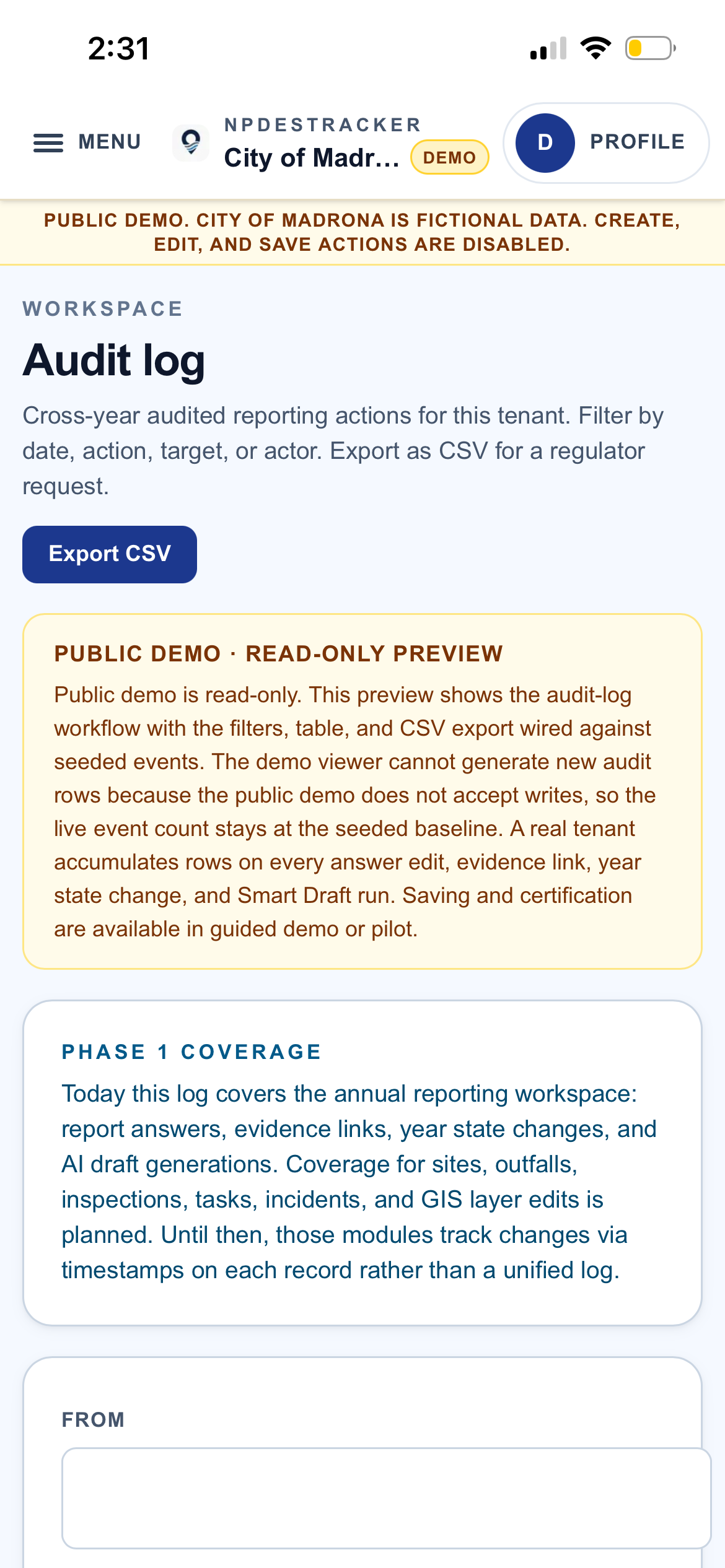
Audit log workspace
One filterable view of every audited reporting action.
The Audit log workspace records evidence links, year state changes, Smart Draft runs, and answer edits across the annual reporting workspace. Filter by date, action, target, or actor. CSV export is wired for regulator requests.
The Audit log workspace surfaces the annual reporting workflow: report answers, evidence links, year state changes, and Smart Draft runs. Sites, outfalls, inspections, tasks, incidents, and GIS edits carry their own per-record timestamps and field-level change history alongside it.
Fully populated, fictional demo data only. Available in Full MS4 Platform tenants. The public demo is a read-only tour and does not expose the Audit log workspace; walkthrough on request.
04 · Scope
Counts from records, not scores from blanks.
NPDESTracker shows the records you have, the records you don't, and what's outstanding. Every figure in the annual report ties back to the underlying inspection, incident, BMP record, or enforcement action behind it.
What you'll see
- Records you actually logged
- Counts derived from those records
- Overdue and due-soon items, by program
- What's complete, what's outstanding, what's flagged for review
How counts are computed
- Each number traces to records logged in the reporting period
- Programs you haven't configured stay out of the rollup
- Year-over-year comparisons appear once two years of records exist
- Program status reflects what's complete, outstanding, and flagged for review
05 · Readiness rollup
See where you stand for the year.
A program-level readiness view shows what's complete, what's overdue, what's flagged for review, and what's not yet started across all six MCMs. Cadence-aware, so quarterly and annual obligations are surfaced before the deadline rather than after.
Status reflects what's in the records, on a timeline you can act on.
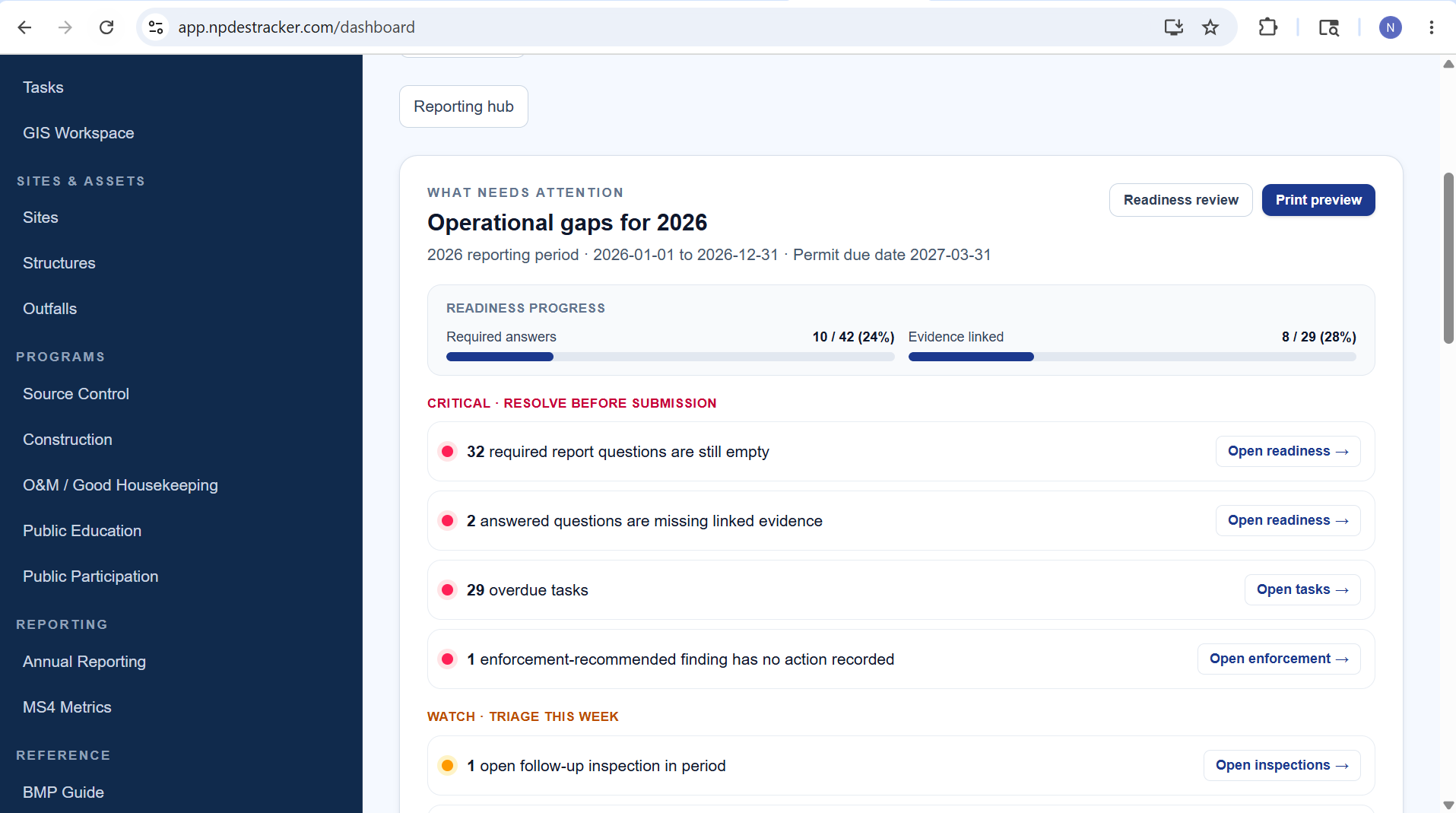
The Operational gaps view counts what is still missing from the year and points to where to fix it. Required answers, linked evidence, overdue tasks, and findings without a recorded action all live in one place. Fictional product-example data only; Annual Reporting is not part of the public demo.
06 · WA Phase II template
Built around the WA Phase II Western 2024-2029 template.
The reporting workspace ships with the WA Phase II Western 2024-2029 annual report template wired in: section structure, question prompts, expected evidence kinds, and the permit citations behind each line. Coordinators do not assemble a template from scratch each year. The structure is already there.
The official Ecology source documents (permit landing page, full permit PDF, Appendix 3 Annual Report Questions, Appendix 12 Existing Development, Appendix 13 IDDE Reporting, Appendix 14 SMAP) are surfaced inline on the reporting workspace so a supervisor can verify a citation or pull a permit appendix without leaving the page. The Phase II framing that carries the six federal Minimum Control Measures across state templates is on the Phase II MS4 software page.
07 · Evidence linking
Suggested evidence records on every answer.
Each question on the template knows what kinds of evidence support it. When a coordinator answers an MCM 4 question about construction inspections, the workspace surfaces the inspection records from the reporting period that match the question's expected record kind. Linking is one click. The link reason is captured for the audit log.
Enforcement actions are first-class linkable records. A notice of violation that closed an MCM 4 deficiency, an enforcement letter that resolved an IDDE source, and a compliance schedule from MCM 6 all sit alongside inspections, IDDE incidents, BMP records, and outreach activities as evidence the answer can point to. The MCM 1 outreach side is detailed on the public education page; the MCM 2 participation side is on the public participation page.
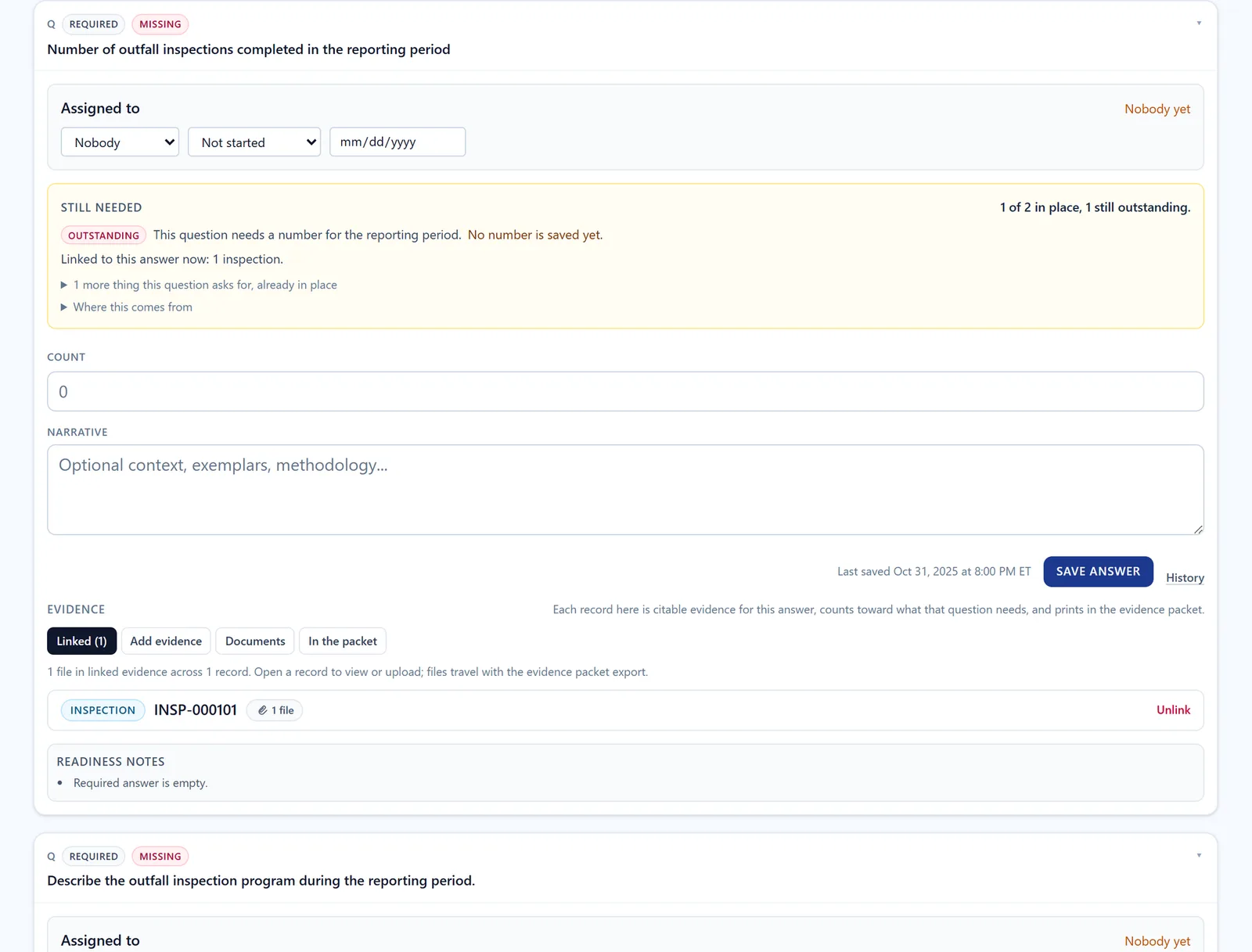
One question with its linked evidence: what it still needs, the inspection linked to it with one file, and the readiness notes. Screen from a synthetic workspace with invented records, not a customer's. Annual Reporting is locked in the public demo.
08 · State workflow and certification
Open. In review. Submitted. Locked.
Each reporting year carries a state. Open while staff are saving draft answers. In Review while a supervisor is reviewing. Submitted once the year has been marked submitted, with the signatory information captured on the record. Locked as the final archive state.
Submission state changes are append-only on the audit log: who changed what state, when, and any signatory information captured at submission. The transition rules are enforced server-side, not just in the UI, so the audit trail holds up whether the year was opened, returned to draft, submitted, or locked.
09 · Print preview and report package
Save as PDF from your browser. Submit through your agency's channel.
The reporting workspace renders a print-friendly view of the full annual report. Municipality, year, period, due date, state, certification info if present, every section in template order, every question prompt, every saved answer, every auto-derived value, every linked evidence summary, and the generated timestamp at the bottom. No app shell, no edit buttons, just the report.
Use your browser's Print dialog or Save as PDF. The output is a clean municipal-style document you can attach to an email, hand to the city attorney for review, or submit through your state agency's channel.
Submission stays with the human at your agency, on the agency's channel. NPDESTracker renders the report; your staff submits it through Ecology or the relevant state portal.
What a report package contains.
Beyond the browser's print dialog, the Prepare report package page builds the report as it stands, on the server, and keeps it with the reporting year. Staff choose the formats, who the package is for, and which files it carries, check the preview, then build it. Every page is marked DRAFT until a certification is recorded for that report.
- The report as a PDF, section by section
- The evidence appendix as a PDF: the records and files behind each answer
- A spreadsheet (.xlsx) of the answers and the evidence list, and a CSV of the answers as one plain table
- An editable document (.docx) of the report, for edits before it is shared
- An archive (.zip) of everything chosen plus the attached evidence files, a manifest, and a README that names who submits: the permittee
- A choice of audience: internal, which may include private files, staff notes, and the audit log, or external, which never includes private files
Single exports exist too: a CSV of the answers, a Markdown summary, an evidence packet, and the editable draft. NPDESTracker never submits a report to an agency; the permittee reviews, certifies, and submits.
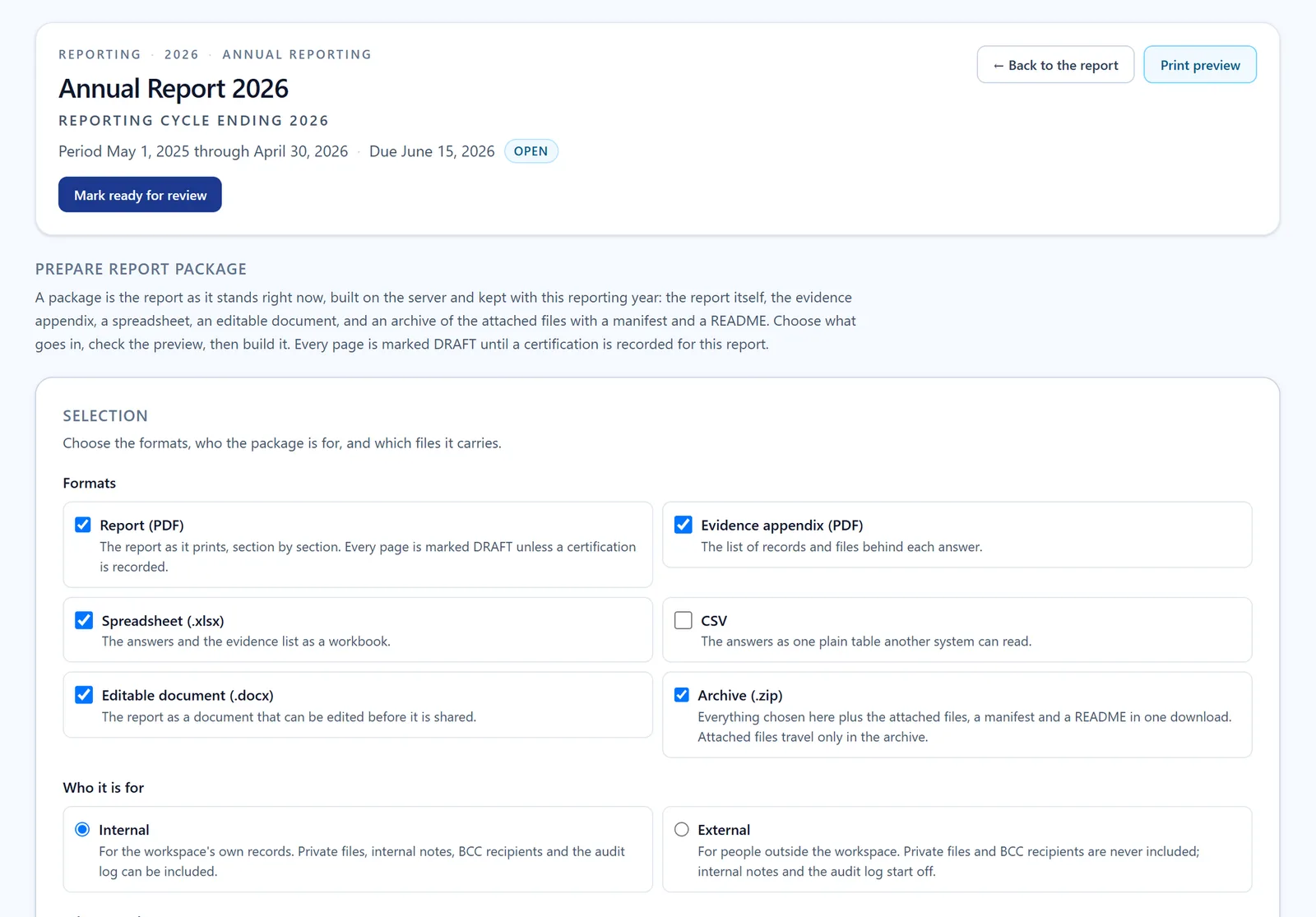
Screen from a synthetic workspace with invented records, not a customer's. Annual Reporting is locked in the public demo.
Further reading
- OverviewMS4 compliance software for municipal stormwater programs
- WorkflowMS4 annual reporting software: how each MCM section pulls from the records you kept
- WorkflowNPDES annual reporting software for municipal stormwater programs
- WorkflowStormwater annual report evidence tracking: photos, GPS, attachments, and linked records
- BlogHow to make an MS4 program audit-ready (without rewriting your spreadsheets)
- BlogTracking post-construction BMPs without losing them: a working guide for MS4 programs
- ProductPublic education tracking for MCM 1: outreach records, audience segments, reach methodology
- ProductPublic participation tracking for MCM 2: meetings, comment periods, volunteer events, outcomes
- ProductMS4 Metrics: a read-only supervisor snapshot of program health and reporting readiness
- ProductBMP Guide and field reference for municipal staff: inspection support and training reference
See it run.
Open the demo to tour Dashboard, My Work, Coordinator, Inspections, Sites, Outfalls, Contacts, Organizations, Tasks, Map, and read-only Setup, or request a guided walkthrough of this module.