
Stop paying for every stormwater software customization.
NPDESTracker is a configurable workspace designed to adapt to municipal stormwater programs. Modules, terminology, fields, dropdowns, displays, supported exports, and custom-module availability depend on the selected annual plan and written order. Custom engineering remains separately scoped.
Configured for the director's view
A readiness view directors can act on.
When the workspace is configured for your program, the same records inspectors capture roll up into a readiness command center your directors review. Evidence gaps, follow-ups, and program health on one dashboard view.
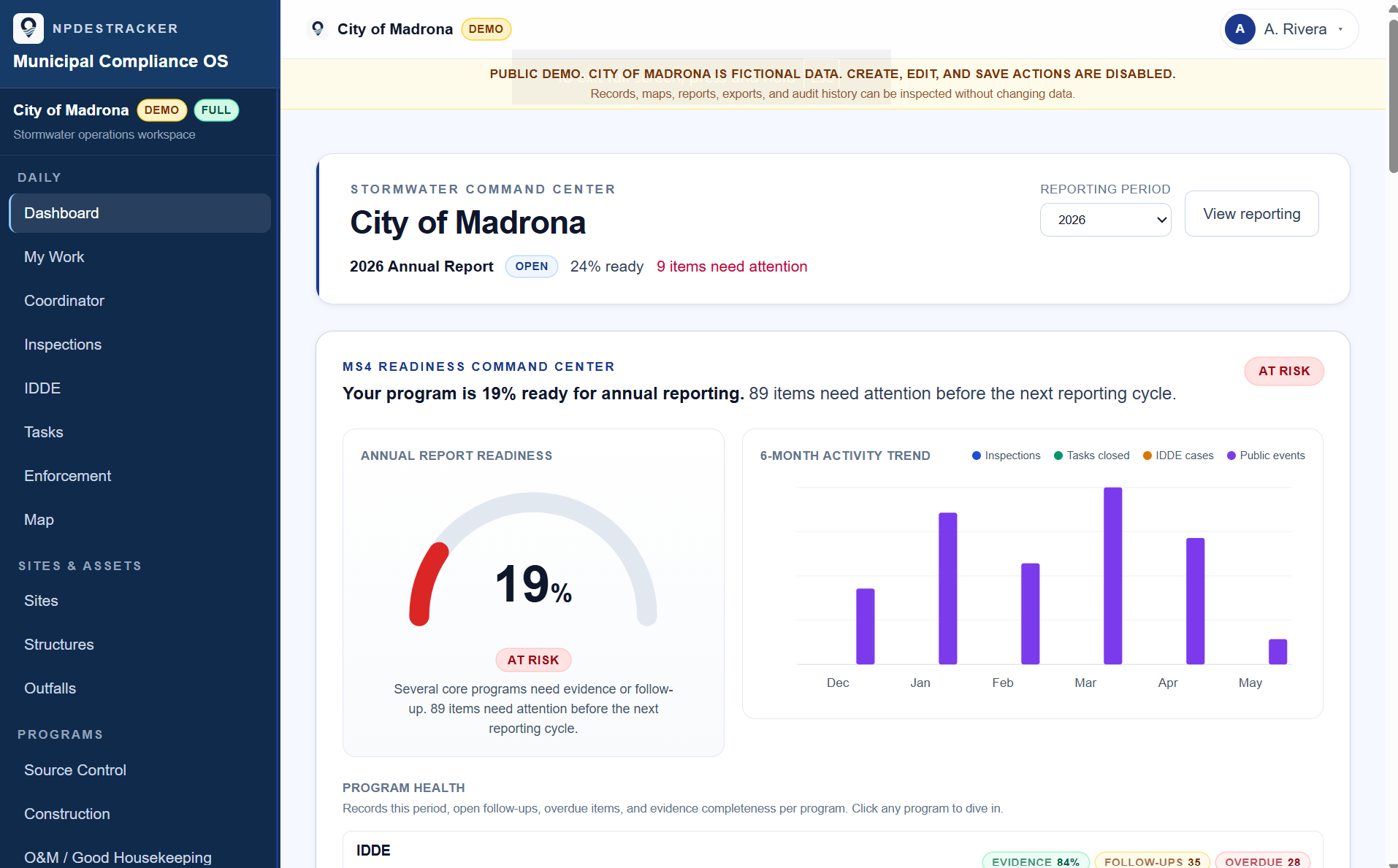
Where the reporting year stands.
Annual report progress at a glance, with the items still open visible per question instead of buried in a spreadsheet.
Six months of the work, in one view.
Inspections logged, tasks closed, IDDE cases opened, and public works activity, charted month by month from the records the team kept.
Status by module, evidence gaps surfaced.
Each MS4 program area carries its own health row so deficiencies surface before they become audit findings.
Fully populated, fictional product-example data. This expanded readiness dashboard is walked through on request and is not part of the public demo. Live tenants configure modules, thresholds, and dashboard widgets per program.
01 · Why rigid stormwater software breaks down
When every program change is a vendor ticket, the software is the bottleneck.
Most municipal stormwater platforms are rigid where the program needs flexibility (terminology, BMP types, field labels, module visibility) and flexible where the program needs guardrails (anything that should be the same across years and audits). The result is a workspace that does not look like the program, and a vendor relationship that is structurally expensive to operate.
- Every label change becomes a vendor ticket. The program says 'catch basin'; the workspace says 'discharge structure'; the inspector ends up writing the real word in a free-text note.
- Every new dropdown value becomes a paid services line. A new BMP type or a new enforcement action is a quote, not a configuration change.
- Every new field becomes a custom development engagement. The form does not match the program because changing it costs more than working around it.
- Module visibility is hard-coded. A program without public participation still sees MCM 2 surfaces in navigation. A team without source control still sees source control widgets.
- The export format is whatever the vendor decided. The state-agency reviewer asking for the data gets a vendor-shaped report that no longer matches the way the program runs.
In the workspace
What configured records look like.
Two fictional product examples. These expanded reporting views are not part of the public demo. The configuration is invisible in the screenshots; what shows is the records the program kept and what the workspace surfaces from them.
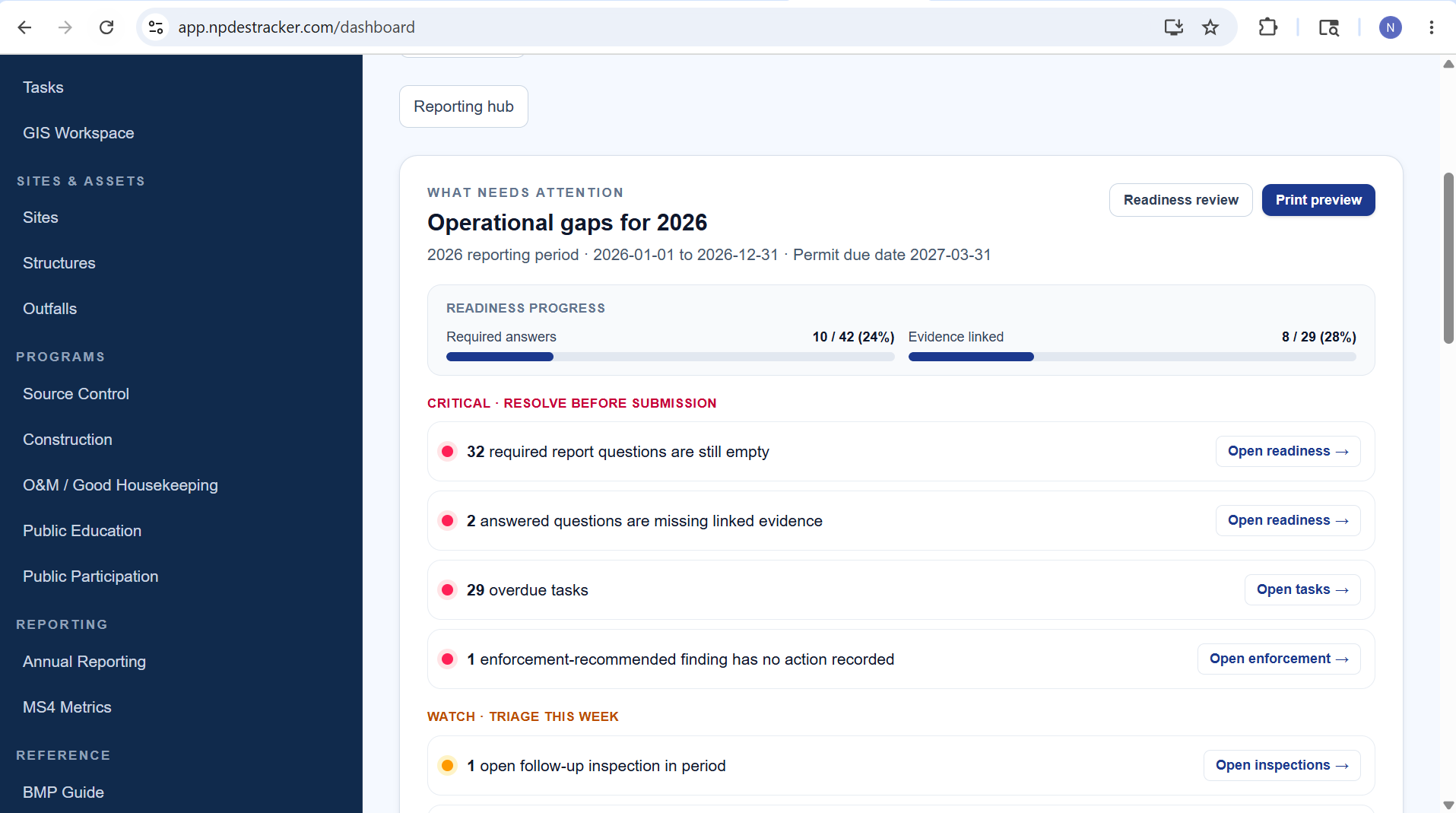
Operational gaps
Required answers, evidence-linked progress, and critical items left for the reporting year, surfaced from the records.
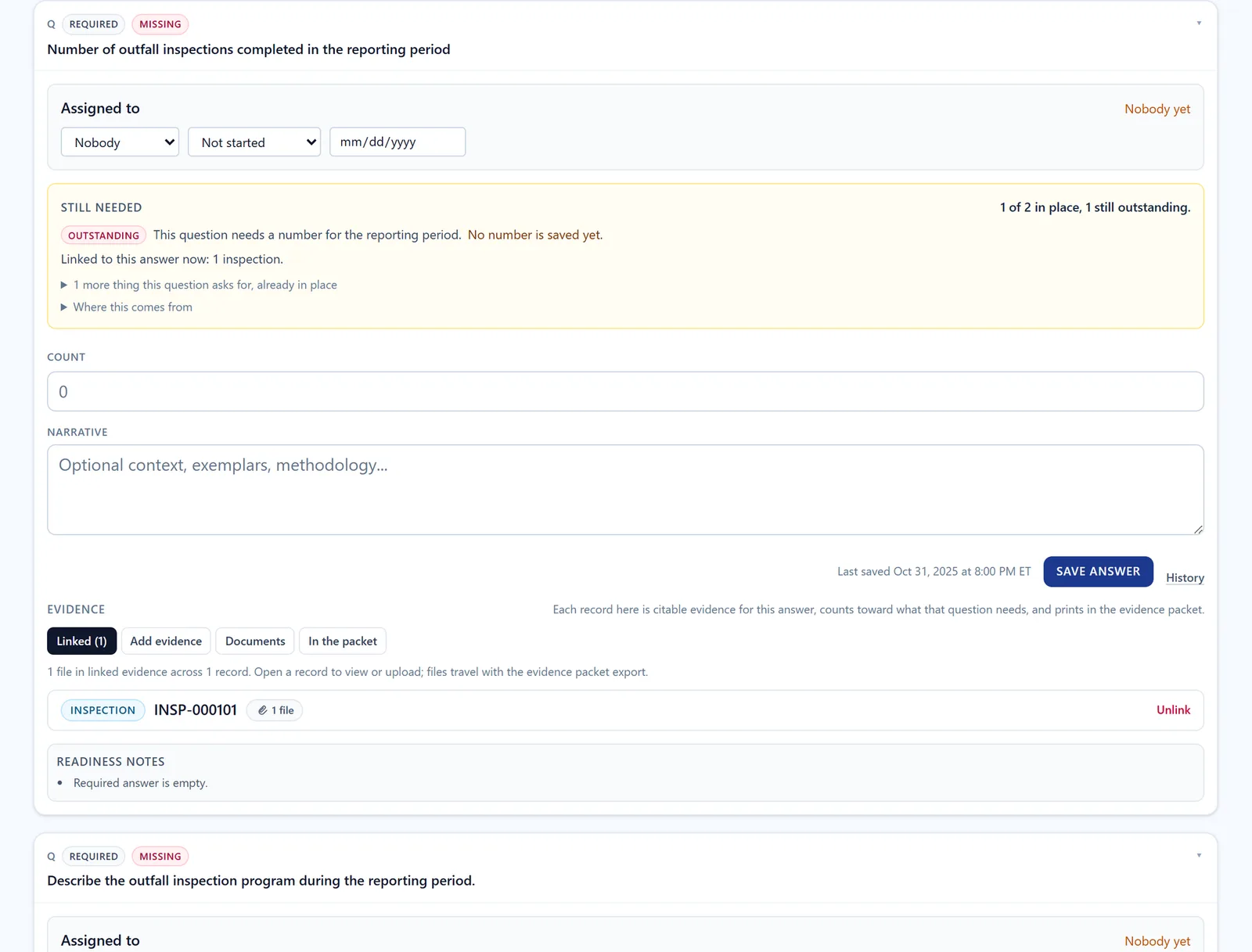
Evidence linking
One report question with the records linked as its evidence, what it still needs, and the readiness notes. The configured record kinds are what the question can point to. Synthetic workspace with invented records.
02 · What municipalities should be able to configure themselves
A working list of what tenant administrators should own.
The configuration that should never trigger a paid services ticket. None of this is custom development; it is workspace personalization that should ship with the platform.
Self-service in any modern stormwater platform
- Module visibility, so the workspace only shows what the program runs
- Terminology and field labels, so the form uses the program's words
- Inspection field configuration per kind: which fields show, which are required, what the labels say
- Dropdown values on inspection forms, editable by a tenant administrator
- Default views and dashboard widgets per role
- Display settings (visible columns, column order, sort defaults)
- Small custom modules built from existing platform building blocks
- Site, contact, and asset inventories imported from standard formats
03 · What NPDESTracker lets teams configure
Included self-service configuration, eight surfaces.
Each item is part of every annual plan. A tenant administrator does the work in the workspace.
01
Module toggles
Turn modules on or off so the workspace only shows what your program actually runs.
02
Terminology and labels
Rename programs, labels, and headings to match the language your team and your permit already use.
03
Configurable inspection fields
Add and edit fields per inspection kind. Which fields show, which are required, what the labels say, and what order they appear.
04
Dropdown values
Edit the dropdown choices on inspection forms (BMP types, finding categories, enforcement actions) so they read the way your program writes them.
05
Display settings
Workspace display preferences (default views, visible columns, dashboard widgets) configurable per tenant and per role.
06
Custom modules
Publish small custom modules built from the platform's controlled module builder: record types, fields, dropdowns, and workflows.
07
Export-ready records
Exports are available in supported formats for modules included in the order; format and scope are confirmed during setup.
08
Mobile-ready field workflows
Responsive mobile web can be evaluated on connected phones and tablets. A production offline mode and native field app are not currently offered.
04 · Custom modules from controlled building blocks
Custom modules are self-service when they are built from the platform's tools.
A custom module in NPDESTracker is a small workflow your tenant administrator composes from the platform's controlled module builder: a record type, the fields it carries, the dropdowns those fields use, and the workflow steps the record moves through.
That kind of custom module is included with the annual plan. The platform controls the building blocks (record types, field types, workflow patterns) so the audit trail, the role-based access, and the export pipeline keep working. The tenant administrator composes; the platform enforces structure.
If a workflow needs custom engineering beyond those building blocks (a new platform capability, a bespoke integration, a workflow concept the platform has never modeled), that work is scoped separately during a kickoff conversation. NPDESTracker does not promise unlimited free custom development, and we say so on every page where it would matter.
05 · What is included vs scoped separately
The line, said plainly.
What is configuration. What is custom engineering. No surprises on either side.
Included self-service configuration
- Module toggles
- Terminology and labels
- Configurable fields per inspection kind
- Editable dropdown values
- Display settings, default views, dashboard widgets
- Custom modules from platform-controlled building blocks
- Export-ready records (CSV, JSON, GeoJSON)
- Connected mobile-web workflows, verified on agency devices during evaluation
Scoped separately
- Custom engineering beyond the platform's configuration tools
- Substantial historical data migrations
- Bespoke integrations beyond standard formats
- Procurement work outside the standard evaluation or annual agreement
Scoped separately means a written scope before work starts. Scoped custom work is defined in writing on the order form.
06 · What this does not pretend to do
Honest limits.
Some of these may change later. None of them are claimed in the meantime.
- Self-service configuration is included with every annual plan; scoped custom work for agency-specific forms, modules, workflows, or reports is defined in writing before kickoff.
- Does not let customers write SQL against their tenant or edit the database directly. Configuration happens through structured options the platform exposes.
- Does not claim guaranteed compliance. The configurable workspace is the tool; compliance still depends on the program doing the work.
- Does not auto-submit reports to any state agency. The submission step stays with the human at the agency, on the agency's channel.
- A production offline mode and native field app are not currently offered. Loading and saving mobile-web records requires connectivity.
07 · FAQ
Frequently asked questions.
Honest answers to the questions that come up most often.
What does configurable stormwater software mean?
It means the municipality can change modules, terminology, inspection fields, dropdown values, display settings, exports, and custom modules in the workspace as part of the annual plan. It does not mean writing SQL, editing the database, or commissioning unlimited custom code. The platform exposes structured configuration options; the city configures within those.
Can a municipality add its own fields?
Yes. A tenant administrator can configure inspection fields per inspection kind: add fields, edit labels, set which fields are required, and reorder them. The field types are platform-controlled (text, number, date, photo, GPS, dropdown, multi-select, etc.); which fields appear on which form is your team's call.
Can a municipality create custom modules?
Yes, when the module is built from the platform's controlled module builder: record types, fields, dropdown values, and workflow steps that the platform already supports. That is included self-service configuration. If a workflow needs custom engineering beyond those building blocks, that work is scoped separately before kickoff.
Is this the same as custom software development?
No. Self-service configuration is not custom software development. The municipality is changing structured options the platform already exposes, in a controlled workspace, with an audit trail. Custom software development (a new platform capability, a bespoke integration, a substantial migration) is scoped separately and quoted before work starts.
Does configuration replace compliance review?
No. The configurable workspace is a better tool than the spreadsheet or a rigid SaaS, but compliance still depends on the program doing the work. The product does not claim guaranteed compliance and does not auto-submit reports to any state agency. The submission step stays with the human at the agency.
Can field staff use configured workflows on mobile?
The responsive web interface can be evaluated on connected phones and tablets. Loading and saving records requires a reliable connection, and device-dependent photo, GPS, and field-markup behavior should be verified during evaluation. A production offline mode and native field app are not currently offered.
08 · See it on sample data
See the configurable workspace.
Open the demo to tour Dashboard, My Work, Coordinator, Inspections, Sites, Outfalls, Contacts, Organizations, Tasks, Map, and read-only Setup on sample data, or request a private demonstration configured around your own program.
See related pages: stormwater inspection software · MS4 inspection software · digital stormwater inspections · pricing