
MS4 inspection software
MS4 Inspection Software for Phase II Programs.
Permit-aligned inspection workflow for the six MCMs your program already runs. Structured forms per inspection kind, map-based field workflow, tasks for follow-up, and field markups keep inspection records together. Correspondence starts with Inspection Team; Full MS4 Platform connects the broader program to annual reporting.
The public demo uses a fictional city's data and is read-only on our side: nothing you try there is saved on our servers. No signup.
01 · Who this is for
Phase II MS4 programs running inspections across the six MCMs.
For stormwater coordinators, inspection supervisors, and field inspectors at Phase II MS4 cities, counties, and special districts. The inspection workflow lines up to the six MCMs the permit uses. Inspection plans export records for your reporting process; Full MS4 Platform links those records directly to the annual report.
A private demonstration on your own workflows is the usual starting point. Inspection Starter ($2,499/year, up to 5 users) covers inspections and GIS. Inspection Team ($4,999/year, up to 15 users) adds correspondence and supervisor workflows. Full MS4 Platform covers programs that want annual reporting and broader MS4 workflows in the same workspace. Request a written quote to confirm the annual plan and any separately scoped setup services. Prices shown exclude applicable taxes. Applicable taxes will be added to invoices unless a valid exemption applies.
A look at the workspace
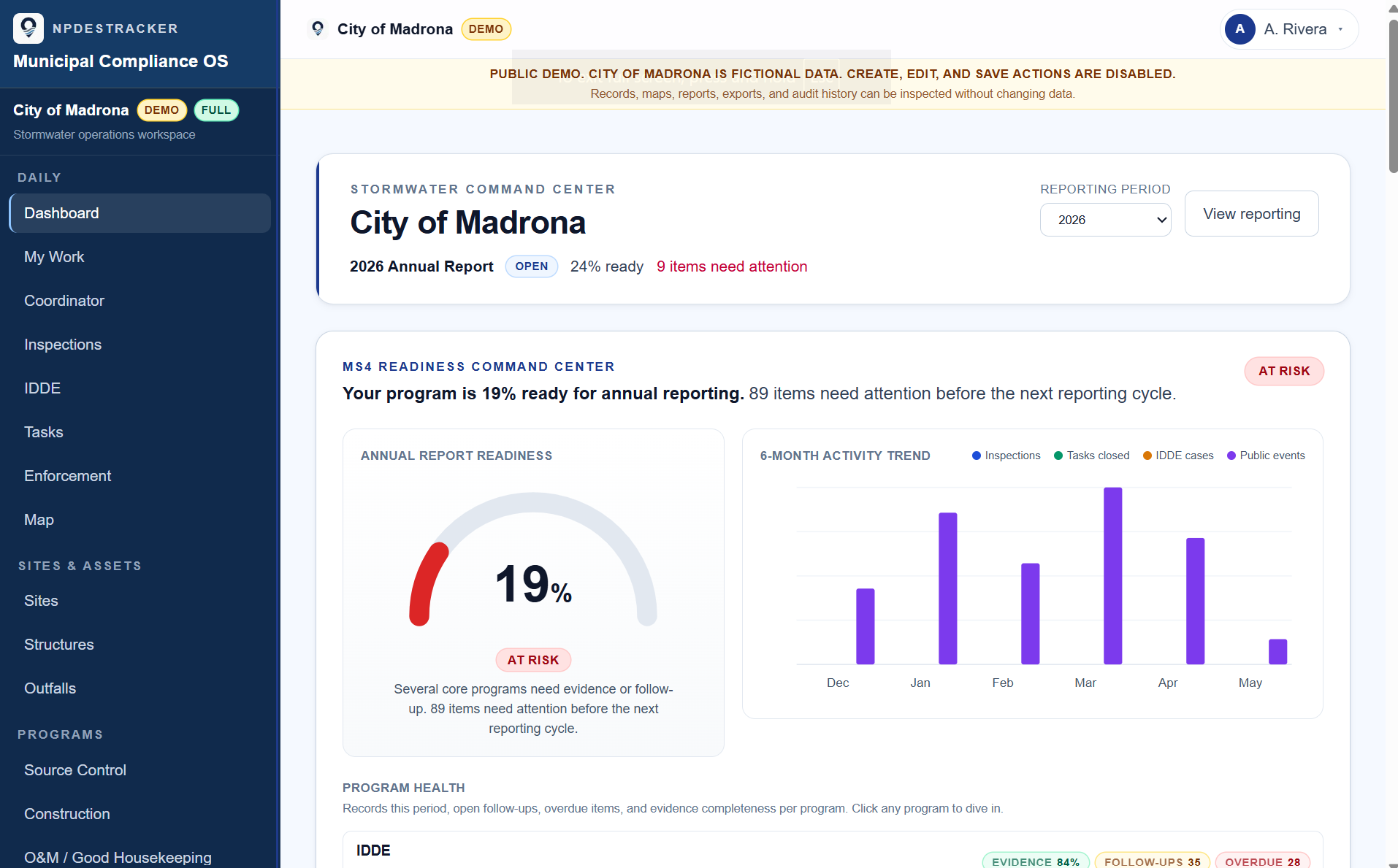
See how a sample MS4 workspace connects sites, inspections, tasks, contacts, enforcement drafts, GIS context, and reporting evidence.
02 · Inspection workflows supported
Permit-aligned forms across the MCMs.
Each kind has its own form, with the fields a Phase II permit cares about. The full inspection workflow is on the inspections page, and the broader overview is on the stormwater inspection software page.
Workflows
- MCM 3 IDDE: complaint intake, dry-weather screening, source-tracing, and closure
- MCM 4 Construction Stormwater inspections during active build-out
- MCM 5 Post-construction BMP inspections on accepted assets
- MCM 6 O&M / Good Housekeeping inspections at municipal facilities
- Source Control inspections at industrial and commercial sites
03 · What inspectors do
One record carries the inspection.
The inspector opens the site, checks the last finding, fills out the structured form, attaches photos and files, and marks field observations on a separate exportable layer. The follow-up task is on the same record. Inspection Team and Full MS4 Platform also include draft notices when the finding warrants correspondence.
In the inspector's day
- Sites, structures, and assets on a live map
- Site history visible on every record
- Structured forms per inspection kind, aligned to the MCM
- Photos and files attached to the inspection
- Tasks for deficiencies, return visits, and cleanup checks
- Field markups as a separate exportable layer
- Draft notice templates from inspection records (Inspection Team and Full MS4)
- CSV and GeoJSON exports of records, markups, and evidence
04 · What supervisors see
The state of the program, by MCM.
Supervisors care about what is owed, what is overdue, and what happened on a site after the inspection. My Work surfaces personal load, overdue tasks bubble up across the program, and enforcement records link back to the inspection that triggered them. The annual report draws from these same records when the Full MS4 Platform tier is in use.
What supervisors see
- My Work view that surfaces what each user owns
- Overdue and due-soon tasks across the program
- Enforcement tracking linked to the inspection that triggered it
- Exportable records that feed the annual report and internal review
Scope: NPDESTracker does not submit reports to any state agency and does not certify compliance. Optional drafting tools are staff-reviewed. See Terms for the full posture.
06 · FAQ
Frequently asked questions.
Honest answers to the questions that come up most often.
How does MS4 inspection software map to the six MCMs?
Each inspection kind in NPDESTracker lines up to the MCM it feeds. IDDE complaint intake, screening, and source-tracing feed MCM 3. Construction Stormwater inspections feed MCM 4. Post-construction BMP inspections feed MCM 5. O&M and Good Housekeeping inspections feed MCM 6. Source Control inspections are tracked alongside the MCM cycle.
Is this designed for Phase II MS4 permittees specifically?
Yes. NPDESTracker is built for Phase II MS4 cities, counties, and special districts. The inspection forms and the annual reporting workflow are shaped around the six-MCM federal framework that state agencies use.
Will inspection records feed our annual MS4 report?
On the Full MS4 Platform tier, inspection records roll into the annual reporting workspace with per-question evidence linking. On the Inspection Starter or Inspection Team tier, inspection records export cleanly as CSV / GeoJSON to whatever annual reporting process the city uses.
Does NPDESTracker submit our annual report to the state agency?
No. NPDESTracker does not auto-submit reports to any state agency. The submission step stays with the human at the agency, on the agency's submission channel. The product produces a print-friendly annual report view and standard format exports on the Full MS4 Platform tier.
What does a private demonstration cover for an MS4 program?
A live walkthrough of sites, contacts, inspections, tasks, My Work, field markups, draft notices, enforcement tracking, and CSV / GeoJSON exports on the workflows your MS4 program runs. Available workflows depend on the annual plan you select: correspondence starts with Inspection Team, and annual reporting is included with Full MS4 Platform. A demonstration is not a purchase; the annual plans are on the pricing page.
Can the tool track enforcement actions back to the inspection that triggered them?
Yes. Enforcement records link back to the source inspection. The chronology stays intact through the annual report and any state-agency request for an audit-defensible record history.
Related inspection software pages
The rest of the inspection cluster.
Each page covers a focused slice of the inspection workflow. Pricing is the same across the cluster: Inspection Starter or Inspection Team for the annual tier, with a private demonstration on request.
stormwater inspection software
The overview landing page for MS4 inspection teams.
Opendigital stormwater inspections
Replacing the PDF + folder + spreadsheet stack with one record.
OpenIDDE inspection software
Complaint to closure on one thread per incident.
Opensource control inspection software
Industrial and commercial site inspections with re-inspection cadence.
Openconstruction stormwater inspection software
Active build-out, rainfall-triggered, and BMP findings on one record per visit.
Openfield inspection software for MS4 teams
The browser web app on connected phones and tablets today, with no production offline mode. The native iOS app is available in the US App Store for iPhone with iOS 17 or later.
OpenAlso see pricing and the read-only demo (opens in a new tab), which uses a fictional city's data.
See the MS4 inspection workflow on sample data.
Tour the read-only Inspections view alongside Dashboard, My Work, Coordinator, Tasks, and Map, or view pricing for the annual tiers.
The public demo uses a fictional city's data and is read-only on our side: nothing you try there is saved on our servers. No signup.