
Smart Draft
Start your annual report answers with the records already linked.
Smart Draft uses templates to prepare a first draft for supported annual report questions. Link the records, check the details, and edit the wording before you save. Staff control the final answer. Smart Draft never submits, certifies, or locks a report. Request a private demonstration to try the reporting workflow; Smart Draft authoring is not included in the public demo.
01 · No blank-page reporting
The annual report should not start as a blank document.
An annual report answer often needs information from several inspections, activities, or follow-up records. Linking those records to the question gives you a starting point you can check.
Smart Draft uses that linked evidence to prepare an answer. Review the records, correct the wording, and add the details your agency needs before saving.
What blank-page reporting feels like
- A coordinator stares at a blank cell on the annual report and tries to remember what work was done last March
- Someone exports a spreadsheet, sorts by date, and copy-pastes summary lines into the report
- An answer is paragraph-style and reads as if it was written from memory, because it was
- The state-agency reviewer asks for the records behind a number, and they live in three folders, two inboxes, and a binder
02 · Evidence-linked narratives
Starts from records you can point to.
Smart Draft does not invent program activity. It pulls from the records that have been linked to the question and offers a starting point for the coordinator to edit. The underlying evidence stays visible alongside the draft, so a coordinator can verify each fact before accepting any of it. The full story of how counts roll up across all six MCMs is on the annual reporting page.
Evidence kinds Smart Draft can read from
- Construction site inspections from MCM 4
- Post-construction BMP inspections from MCM 5
- IDDE incidents, screenings, and source-tracing records from MCM 3
- Public education events and outreach activities from MCM 1
- Public participation records and meeting minutes from MCM 2
- Municipal facility inspections and good-housekeeping logs from MCM 6
- Enforcement actions and notices of violation
- Staff training records
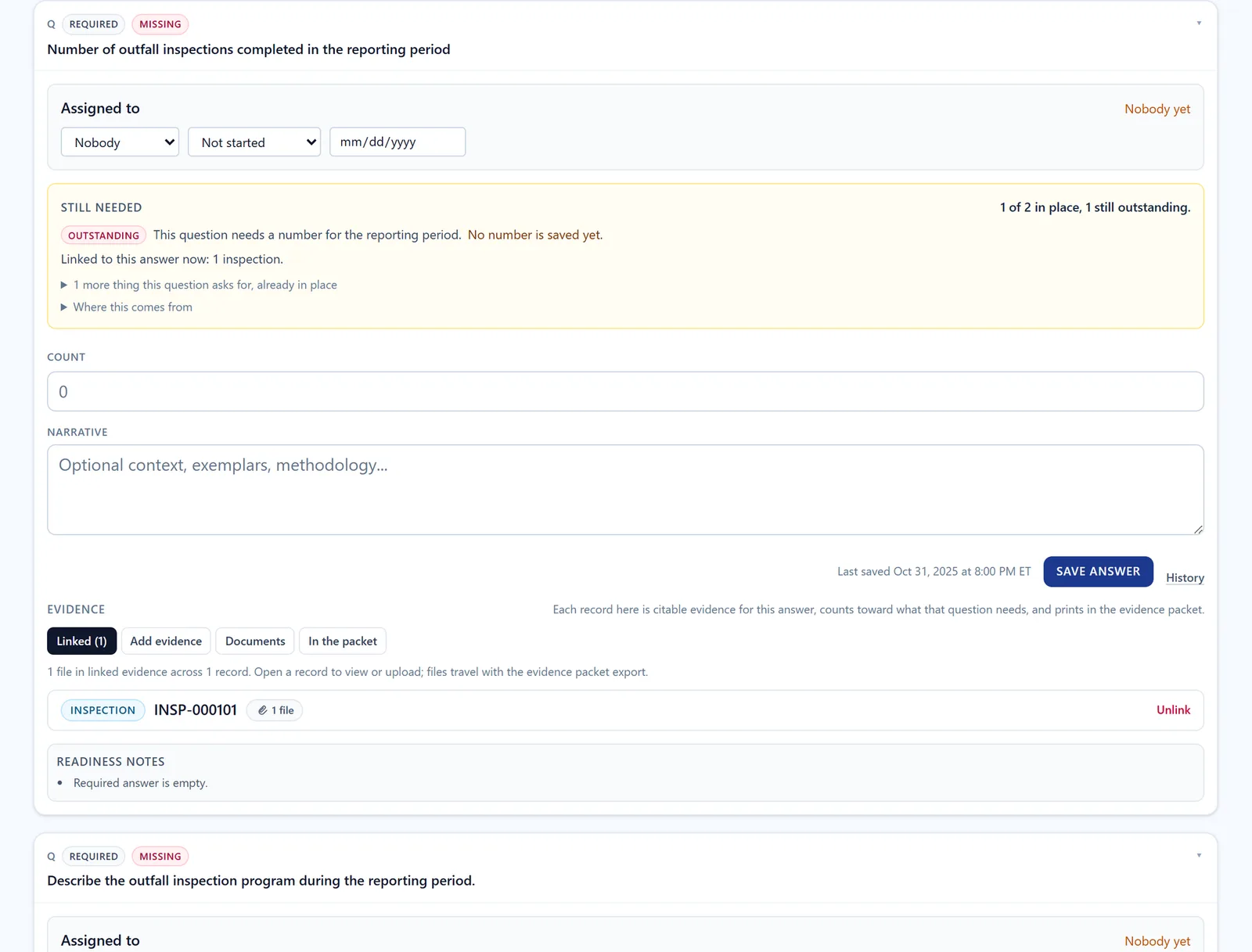
Smart Draft starts from the records already linked to a report question, like the inspection linked to the question shown here. The draft is only a starting point: staff review the language, confirm the totals, and decide what to save. Screen from a synthetic workspace with invented records, not a customer's; the draft itself is not shown, and Annual Reporting is not part of the public demo.
03 · How drafts are prepared
Built from your linked records.
Smart Draft runs inside NPDESTracker and uses templates matched to supported questions. The same records and answers produce the same draft. You can edit the result or write your answer by hand.
Smart Draft does not contact an external AI provider or send your records to one. Read how Smart Draft handles data and staff review for the details.
04 · Staff review
Your team reviews and saves the answer.
Read the supporting records, edit the wording, and remove anything that does not belong. The audit log records who saved the answer and when. Your team remains responsible for reviewing each answer.
What changes for the coordinator
- The draft starts populated with linked records, not as a blank field
- The coordinator reads, edits, and accepts the draft as a normal answer
- The audit log captures who saved the answer, when, and what evidence was linked
- Drafting time on a long-form question drops, and the typing that remains is review and judgment, not retrieval
05 · Hard limits
What Smart Draft does not do.
Some boundaries are worth stating directly, so there is no ambiguity for procurement and IT review.
- Smart Draft does not submit annual reports to a state agency
- Smart Draft does not certify the report or capture signatory information
- Smart Draft does not lock or unlock reporting years
- Smart Draft does not replace staff review of every saved answer
- Smart Draft does not provide legal, regulatory, or compliance advice
- Smart Draft does not determine whether a record satisfies a permit requirement
06 · Security posture
Your agency's records. Your team's review.
A draft only reads records in your agency's workspace. Smart Draft activity is included in the reporting audit log alongside other answer changes.
NPDESTracker does not send customer data to an AI provider and does not use customer data to train any model. Read about access, hosting, and data protection on the security page.
Further reading
- DisclosureSmart Draft: how it works, data handling, and staff review
- ProductAnnual reporting: how counts roll up from records and how the report assembles
- TrustSecurity posture: tenant isolation, audit trails, hosting, and secure development
- PricingPricing: annual plans from Small MS4 Essentials to the Full MS4 Platform for municipal MS4 programs
See Smart Draft on real-shaped data.
Open the demo to tour Dashboard, My Work, Coordinator, Inspections, Sites, Outfalls, Contacts, Organizations, Tasks, Map, and read-only Setup, or request a guided walkthrough of this module.