
MS4 compliance software
MS4 compliance software for municipal stormwater programs.
One workspace for inspections, IDDE, outfalls, BMPs, tasks, public education, public participation, MS4 metrics, and annual reporting. With GIS context on every record and audit trails on the work that matters. Written for the coordinators who actually run the program.
01 · Why MS4 compliance gets hard
Records split across tools, then March arrives.
Most Phase II programs do the work all year and rebuild the annual report from spreadsheets, PDFs, email, and shared drives. The work was real. Reassembling it into a permit-aligned annual report is the part that breaks every year.
MS4 compliance software helps when records live in one place and connect to each other in shapes the permit understands. The longer take is in what municipal teams actually need from MS4 software, and the program-running perspective is in what MS4 programs need from compliance software.
A typical pre-platform stack
- A spreadsheet for inspection counts
- A folder of inspection PDFs on a shared drive
- An inbox of IDDE complaints
- A binder of enforcement letters
- A separate spreadsheet for the BMP inventory
- A GIS layer somewhere that nobody links back to the records
That stack carries a program until the links between records start to matter. The first thing to give is the connection between an inspection and what came after it.
02 · How it all connects
Records that connect. Counts that come from records.
The clearest way to think about MS4 compliance software is as a graph of typed records. The shape of the connections is most of the value. The annual report stops being a separate document and starts being a view of the year you already have.
The full annual reporting story is on the annual reporting page. The inspection-side story is on the inspections page, and the GIS workspace is on the GIS page.
Records and modules in scope
- Inspections (construction, source control, structure, outfall, post-construction BMP, facility)
- IDDE complaints, screening visits, source-tracing, and closure
- Outfall inventory tied to dry-weather screening and incidents
- Drainage structure inventory with cadence-aware inspections
- BMP inventory with as-built reference and inspection history
- Tasks and corrective actions tied to deficient findings
- Public Education and Outreach (MCM 1) activity records
- Public Participation (MCM 2) meetings, comment periods, and volunteer events
- MS4 Metrics supervisor snapshot of program health
- Annual report evidence linked back to the records that support it
- GIS context with site, outfall, structure, and BMP layers on a live map
A look at the workspace
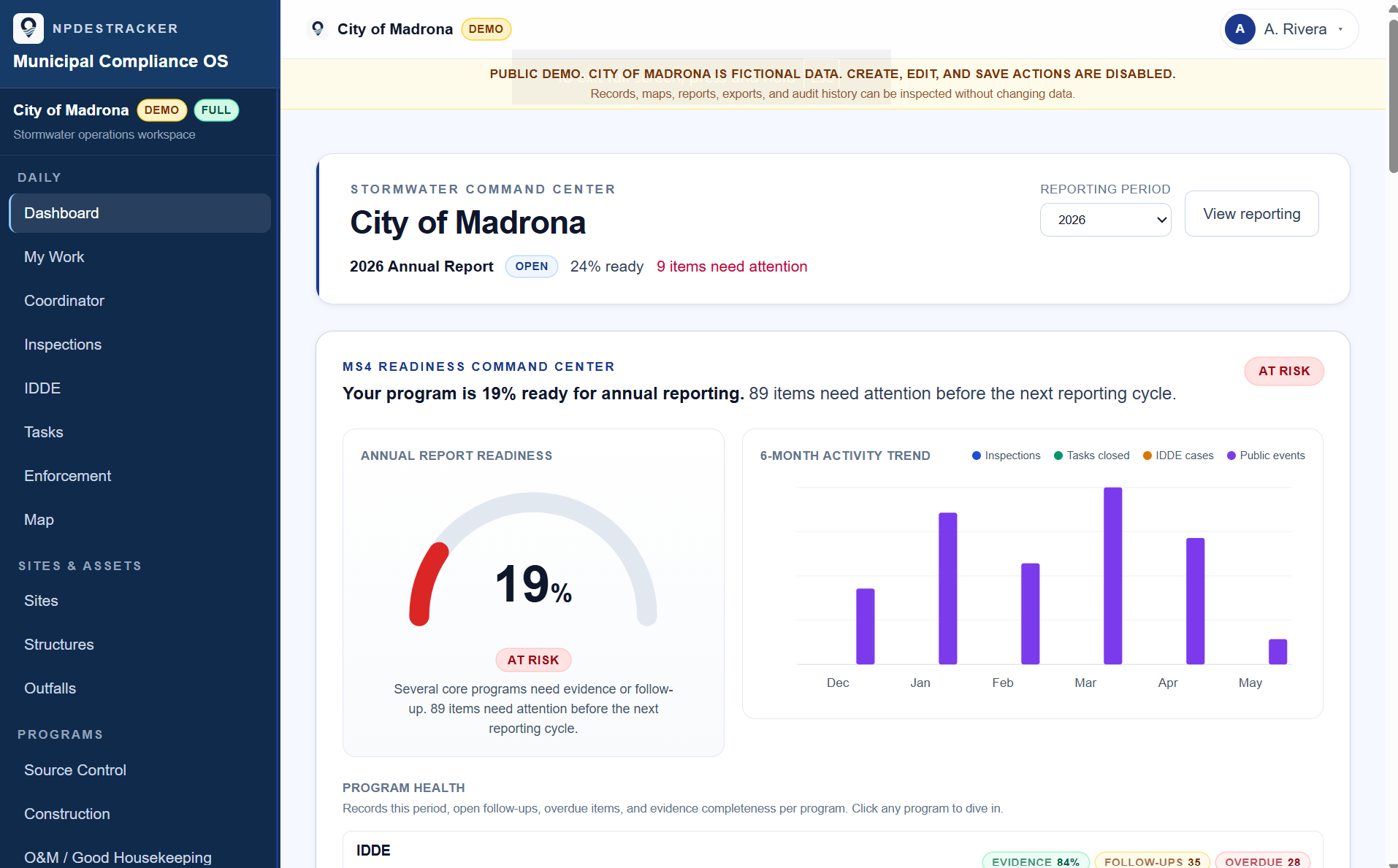
See how a sample MS4 workspace connects sites, inspections, tasks, contacts, enforcement drafts, GIS context, and reporting evidence.
03 · Evidence-backed records
The audit story should be on screen, not in someone's head.
A program is audit-defensible when a state-agency reviewer can ask about any number in the annual report and the underlying records are one click away. Inspections carry photos and GPS pinned to the work. Deficient findings turn into follow-up tasks with closure evidence. Audit trails on key compliance records and reporting actions show what changed and who changed it.
That is what evidence-backed records look like in practice. Not paperwork for paperwork's sake. The story of how the program ran the year, told by the records themselves. We covered the practical side in how to make an MS4 program audit-ready.
04 · Annual reporting on the Full MS4 Platform
The annual report is a view of the year, not a separate document.
On the Full MS4 Platform, counts on the annual report are computed from the inspection, IDDE, BMP, and enforcement records logged through the year. Each question can link directly to the records that support it. Smart Draft is an assistive drafting feature that turns linked evidence into a starting-point draft, which a coordinator reads, edits, and saves. Smart Draft does not submit, certify, lock, or replace staff review. The full posture is on the Smart Draft page and the Smart Draft disclosure.
NPDESTracker does not submit annual reports to Ecology, EPA, or any state agency on a customer's behalf. The submission step stays with the human at the agency, on the agency's submission channel.
What the Full MS4 Platform adds
- Annual report evidence workspace with per-question evidence linking
- Smart Draft report answers from linked evidence, with staff review
- Public Education and Outreach module (MCM 1)
- Public Participation module (MCM 2)
- MS4 Metrics supervisor snapshot
- Annual report state machine with certification capture and print-friendly preview
- Permit-specific annual report templates (currently WA Phase II Western 2024-2029)
05 · If annual reporting lives elsewhere
Starter is a different workspace, not a smaller platform.
Some programs already handle annual reporting in another system. They just need a clean workspace for inspections, GIS, assets, corrective actions, attachments, and exports. The Inspection Starter tier is for those teams at $3,499 a year plus applicable tax. The full description is on the Inspection Starter page, and the search-intent overview is on the stormwater inspection software page.
Starter and Full MS4 Platform are different workspaces with different scopes, not a smaller-bigger pair. If your program wants annual reporting in NPDESTracker, the Full MS4 Platform is the right tier.
What Starter is built for
- Field inspections, sites, outfalls, structures, and BMP inventory
- Tasks and corrective actions with follow-up cycles
- Photo, GPS, and file attachments on records
- GIS workspace with layer import and asset maps
- CSV exports for supported operational records
- Browser-based access, tenant-scoped supported records, and role-based access; confirm MFA requirements before purchase
06 · What the software should help you answer
Six questions an MS4 program runs into all the time.
When the software answers these on the spot, the program runs like a system instead of a memory exercise, and the annual report becomes a view of records, not a reconstruction.
- 01What happened?
- 02Where did it happen?
- 03Who followed up?
- 04What evidence supports the annual report?
- 05What is overdue?
- 06What changed and who changed it?
Open the read-only sample workspace tour to review Dashboard, My Work, Coordinator, Inspections, Sites, Outfalls, Contacts, Organizations, Tasks, Map, and read-only Setup. It runs in an isolated demo tenant with fictional data; nothing can be created, edited, saved, or sent, and no signup is required. Messages & Notices and Annual Reporting are locked.
07 · Workflow pages by topic
Annual reporting, evidence, and the MCM 1 and MCM 2 side of the program.
Each part of an MS4 program has its own workflow page. They describe how the records get captured during the year and how they roll into the annual report.
- WorkflowMS4 annual reporting software: how each MCM section pulls from the records you kept
- WorkflowNPDES annual reporting software for municipal stormwater programs
- WorkflowStormwater annual report evidence tracking: photos, GPS, attachments, and linked records
- WorkflowStormwater public education tracking for MCM 1: Adopt-a-Drain, pet waste, dumpster lid, school programs
- WorkflowStormwater public participation tracking for MCM 2: meetings, comment periods, cleanup events
- WorkflowStormwater behavior change campaign tracking: baseline, outreach, follow-up, partner work
- WorkflowIDDE complaint tracking software: intake, classification, and follow-up
- WorkflowIllicit discharge investigation tracking: field screening, source tracing, elimination
- WorkflowStormwater complaint management software for municipal programs
- WorkflowSource control inspection software: business inspections, findings, and corrective actions
- WorkflowConstruction stormwater inspection software for MCM 4 work
- WorkflowStormwater O&M and good housekeeping software for MCM 6 work
See the full topic index on the stormwater software resources page.
See it on sample data.
Open the demo to tour Dashboard, My Work, Coordinator, Inspections, Sites, Outfalls, Contacts, Organizations, Tasks, Map, and read-only Setup, or request a guided walkthrough of this module.