
Stormwater inspection software
Stormwater Inspection Software for MS4 Programs.
Map-based stormwater inspection software for MS4 teams. Track inspections, tasks, field markups, draft notices, enforcement actions, photos, files, and exportable records on one workspace.
01 · Who this is for
Built for the people running inspection work.
For Phase II MS4 permittees — stormwater coordinators, inspection supervisors, field inspectors, and the program manager who has to assemble the annual report at the end of the year. NPDESTracker is built around how this work actually happens at a city or county.
The Inspection Starter tier at $3,499 a year is the focused annual option for a single inspector, and the Inspection Team tier at $9,499 a year is sized for multi-inspector teams. If your program also wants annual reporting in the same workspace, the Full MS4 Platform tier covers it. Most teams start with the 60-day Guided 60-day Evaluation at $999.
02 · Inspection workflows supported
The inspection kinds an MS4 program runs.
Each kind has a structured form and a clear distinction between site-level and asset-level work. The full inspection workflow is on the inspections page.
Workflows
- IDDE complaint intake, dry-weather screening, and source-tracing
- Source Control inspections at industrial and commercial sites
- Construction Stormwater inspections during active build-out
- O&M / Good Housekeeping inspections for municipal facilities
03 · What inspectors need
The basics, on one record.
Inspectors need to see where they are, what was found last time, and what the form for this kind of inspection looks like. Photos and files attach to the record. Field markups land on a separate exportable layer rather than the authoritative GIS, so the city's source of truth stays under GIS staff control.
What inspectors need
- Map of sites, structures, and assets
- Site history visible on every record
- Structured forms per inspection kind
- Photos and files attached to the inspection
- Tasks for deficiencies, return visits, and cleanup checks
- Field markups as a separate exportable layer
- Draft notice templates from inspection records
- CSV and GeoJSON exports of records, markups, and evidence
04 · What supervisors need
Visibility into the program without rebuilding it from email.
Supervisors care about what is owed, what is overdue, and what happened on a site after the inspection wrapped up. My Work surfaces personal load. Overdue tasks bubble up across the program. Enforcement records link back to the inspection that triggered them.
What supervisors need
- My Work view that surfaces what each user owns
- Overdue and due-soon tasks across the program
- Enforcement tracking linked to the inspection that triggered it
- Exportable records for internal review and recordkeeping
The supervisor surface
A readiness view supervisors and directors actually use.
Inspections roll up into a dashboard view that shows annual report readiness, evidence gaps, follow-ups, and program-by-program health. The same records the inspector captured in the field become the supervisor's program-level picture.
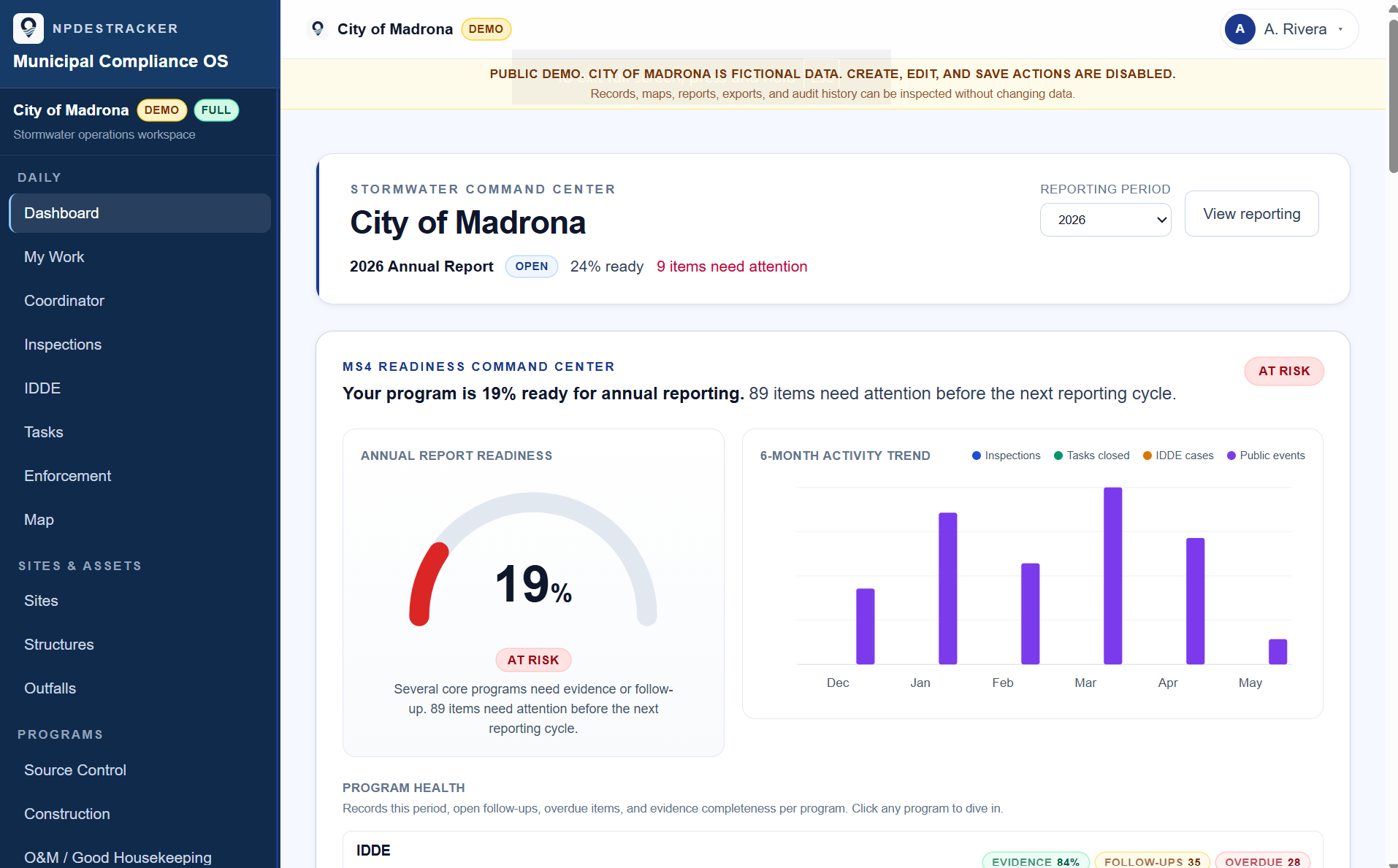
Where the reporting year stands.
Annual report progress at a glance, with the items still open visible per question instead of buried in a spreadsheet.
Six months of the work, in one view.
Inspections logged, tasks closed, IDDE cases opened, and public works activity, charted month by month from the records the team kept.
Status by module, evidence gaps surfaced.
Each MS4 program area carries its own health row so deficiencies surface before they become audit findings.
Fictional demo data. The public demo is read-only. Live tenants configure modules, thresholds, and dashboard widgets per program.
Scope: NPDESTracker does not submit reports to any state agency and does not certify compliance. Smart Draft is assistive — staff review every save. See Terms and Smart Draft disclosure for the full posture.
06 · FAQ
Frequently asked questions.
Honest answers to the questions that come up most often.
Is NPDESTracker stormwater inspection software for MS4 programs only?
It fits Phase II MS4 programs running structured inspection work, and the same workflow runs for municipal stormwater teams operating outside a formal MS4 designation. The inspection kinds (IDDE, Source Control, Construction Stormwater, O&M / Good Housekeeping) match what most municipal programs already run.
Does it work on a phone or tablet in the field?
Mobile web works today on phones and tablets through any modern browser. A native iOS field app is planned for offline inspection workflows, not launched.
How does field markup work, and does it update our GIS?
Field markups land on a separate exportable layer rather than the authoritative GIS. The city's source of truth stays under GIS staff control. The markup layer exports as GeoJSON for the GIS team to review and merge on their own schedule.
Can it send the notice or letter directly to the contractor?
Not today. Notice templates draft from the inspection record and copy or download as email-ready text. You send through your existing email or letter channel.
How do inspection records feed annual reporting?
On the Full MS4 Platform tier, inspection records roll into the annual reporting workspace with per-question evidence linking. On the Inspection Starter and Inspection Team tiers, records export cleanly as CSV / GeoJSON for whatever annual reporting process the city uses.
What does a Guided 60-day Evaluation include?
A 60-day workspace configured to your permit framework with sites, contacts, inspections, tasks, My Work, field markups, draft notices, enforcement tracking, and CSV / GeoJSON exports. Guided setup, email-first support, and a clean export if the city does not continue. $999.
Related inspection software pages
The rest of the inspection cluster.
Each page covers a focused slice of the inspection workflow. Pricing is the same across the cluster: the 60-day Guided Evaluation at $999, then Inspection Starter or Inspection Team for the annual tier.
MS4 inspection software
Permit-aligned inspection workflow across MCM 3 through MCM 6.
Opendigital stormwater inspections
Replacing the PDF + folder + spreadsheet stack with one record.
OpenIDDE inspection software
Complaint to closure on one thread per incident.
Opensource control inspection software
Industrial and commercial site inspections with re-inspection cadence.
Openconstruction stormwater inspection software
Active build-out, rainfall-triggered, and BMP findings on one record per visit.
Openfield inspection software for MS4 teams
Mobile web in the field today, native iOS planned.
OpenOpen the sample inspection workspace.
Walk the inspection workflow on fictional Phase II data. Then email admin@npdestracker.com about an evaluation workspace if it looks like a fit.